
In short: The sales meeting goes through the same numbers every week, and the numbers matter: they decide which deals sellers spend their time on and what the sales lead dares to commit in the forecast. But in a table or on a slide it is hard to see what changed. Here Claude turns the numbers into a short film from one CRM export and one prompt, so the whole team sees the same deals move and can spend the meeting on decisions. The prompt and the script are free to take.
Try it: pick an export, or edit five rows and see what it does to the pipeline. The figures in the demo come from Claude, and if you edit rows, the page recomputes them without calling Claude.

AI workflow automation for the sales meeting
The sales meeting is not a waste of time. It is where the team decides which deals need attention next week, and where the sales lead gets the basis for the forecast. The problem is the format. When the numbers sit in the same table week after week, nobody sees the difference, and the meeting becomes a read-through instead of a conversation about what the team should do.
With AI workflow automation, Claude takes the fixed, repetitive part: the figures are worked out from the export, and a short film shows them before the meeting starts. It needs no new system, only the export from the CRM you already use and one prompt.

How does AI help the sales team in the pipeline meeting?
AI gives the meeting its time back for decisions. When everyone sees the same picture of the pipeline in a few seconds, the rest of the meeting goes to the deals that need action instead of to reading numbers aloud.
For the team that means three things. Stalled deals get caught while they can still be saved, because they stand out instead of hiding in row 40. Sellers see their own deals move, so the conversation is about progress rather than figures. And the sales lead sees whether there is enough pipeline to hit the target, so the forecast rests on what the team just saw together, not on a gut feeling.

Change a deal and see the effect at once
The report is interactive, and this is where it makes the biggest difference in the meeting. If someone asks what happens if the two biggest deals in negotiation are won by Friday, you can change them and see the answer on screen at once. It makes it easier to agree where the focus goes and what it takes to hit the target.

Can you trust the numbers?
A good-looking film with a wrong number is worse than a dull table, so the numbers have to hold. With clear rules in the prompt for what each number means, the figures were right every time Claude answered, in a test on four messy exports. The script that draws the film also recomputes every figure, shows it when something does not match, and can be set to stop the report. So the meeting need never open on a wrong number. The whole test is in the zip file.

Take it home
All of it is free to copy and adapt:
- The whole thing as a zip: the prompt, the four exports, the key and the script that computed it, every reply verbatim, the scorer, the render script with its scene, and the tests
- The README, with the columns, the command and what it will not do
- The prompt, ready for your own export
To use it on your own export, pull your deals with the columns in the order the README gives, and rename your stages to the seven names in the prompt. Put the report date, the target and the CSV into the prompt, and save Claude's answer as a file. Then run the render script with --strict. If your CRM has no column for last week's stage, keep Monday's export and copy the stage across next week.
What it will not do. It does not forecast: coverage is open pipeline over target, with no weighting. It will not fix a messy CRM, and a deal nobody updated looks stuck because the export says so. A deal that moved twice in a week counts as one move. The four files are invented and small, and an export with thousands of rows has not been tested.

Internal AI tools for your own Monday meeting
I am an AI consultant in Copenhagen, and I build internal AI tools for Nordic sales teams. Here I would wire the prompt straight to your CRM, so the report is made on its own before the week starts. The figures are recomputed, and the run stops if anything does not match, so the meeting never opens on a wrong number. See how I build internal AI tools.
For a test of the same kind on cleaning up a CRM, read how Claude in Google Sheets merges duplicate companies, and why you read the merges first. And the test of one goal sentence against a flowchart shows the same principle on a website AI agent: write the key before you run anything.
FAQ
Frequently asked questions
Yes, when the prompt says exactly what each figure means. In the test Claude got all 19 figures right in 11 of 12 runs with the rules. The last run gave no answer, so always check that you got figures back.
Because a figure like "stuck" can mean more than one thing. The rules say what counts as a duplicate, a move or a deal with no activity. Without them Claude chose for itself in two places, and the key said otherwise.
Run it again, or use Claude in an app that can run code. In the test every tool was off, and the three replies without figures were a script that never ran. With `--strict` the render script stops with an error when figures are missing or do not match.
Yes, if the export has the nine columns in the right order and the stages carry the seven names from the prompt. The README in the zip shows how. Remove personal data before you give an export to an AI.
No. It shows what happened and where pipeline stands against target. There is no weighting and no prediction.
No. Every company and deal is invented, and owners appear as roles rather than names. The names were searched on the web before use, and five were swapped out.
Handing a fixed, recurring piece of work to an AI such as Claude, here the figures for Monday's meeting, and letting a script check the result before anyone sees it. The check matters as much as the AI.
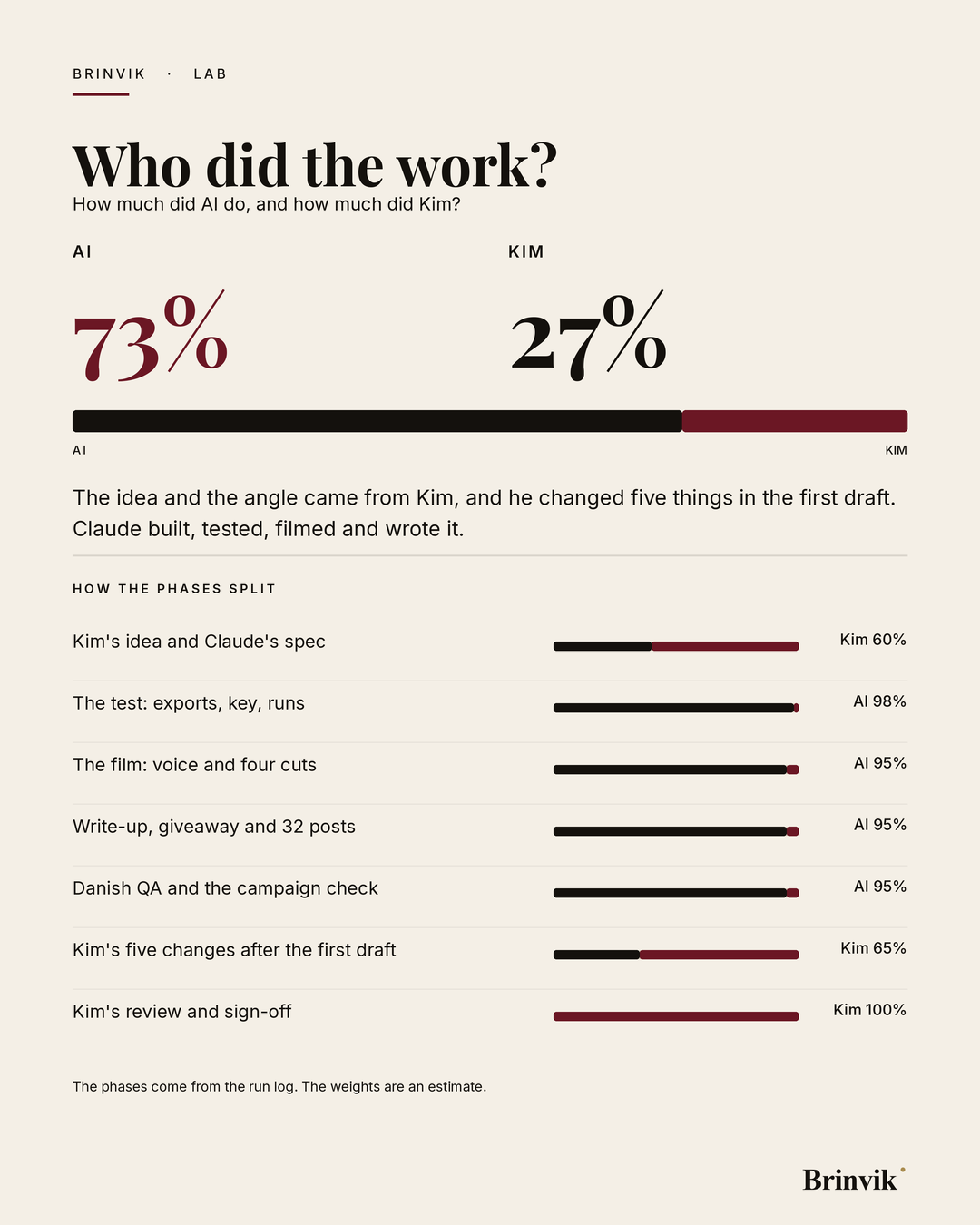
How this page was made. This work was produced together with AI. Overall: AI about 73 percent, Kim about 27 percent. Counting production alone, AI did about 96 percent. The idea was Kim's. Claude wrote the spec, the four exports, the answer key and both prompts, made the runs, built the demo, made the film and wrote the article and the posts. After the first draft Kim changed five things: an illustrated cover, the demo at full size, a split worked out for this page alone, the sales-meeting angle, and a body about the sales team rather than the test. Kim reviews and signs off the page before it goes live. The phases come from the run log. The weights are an estimate.