TL;DR: Claude now works inside Google Sheets, and an obvious first job is finding the duplicate companies in the customer list. I had Claude run it in the sidebar itself, in my account, five times with Sonnet 5.5 and Opus 5.5, on a sheet of 240 invented Danish companies. None of the five runs merged anything wrongly, and each found 11 or 12 of the 12 duplicate pairs. The "same name or same domain" formula merged 13 pairs wrongly. An installed skill made Claude more cautious, even when nobody asked for it. Read the proposed merges before they reach your CRM, because in a CRM like HubSpot a merge can't be undone. The skill and the test sheet are free: download the zip.
On 6 October, Claude for Google Workspace went into public beta on every paid Claude plan. Claude opens in a sidebar next to your doc, sheet or deck, reads the file and edits it in place. In Google Sheets, according to Anthropic, Claude can write formulas, build pivot tables and charts and, when data needs cleaning, "pull a range into Python and write the results back into the sheet".
In the sidebar you pick a model and an effort level and type your request. Before Claude edits the sheet, a card appears saying "Claude wants to run a script", with a list of the changes and three buttons: Deny, Always allow and Allow once. In my account the model picker showed Fable 5.1, Opus 5.5 and Sonnet 5.5, with older models under More models. Haiku wasn't there.

The person likely to try this first is the one who owns the customer list: a sales or RevOps lead with a CRM export and a suspicion that plenty of companies are in there twice. The test ran on 7 October with the same request in Danish every time: find the duplicates, write them to a new tab with a reason, and don't touch the export.

Your sheet has an undo button. Your CRM may not
In the sheet you can undo everything. Claude edits as you, and every change lands in version history. The dangerous step comes later, when the list of suggestions turns into merges in the CRM. Check what your own system can do. In HubSpot it can't be done: "once you've merged two records, it is not possible to unmerge them", HubSpot says in its guide to merging records. What was two records becomes one.
So the number that matters most in this test is how many pairs of different companies each method put together. A missed duplicate costs you a second look next month. A wrong merge moves one customer's history onto another company.
The test sheet holds 240 invented Danish companies in the columns a typical CRM export has, plus a CVR number (the Danish company registration number) where there is one. Claude Code built it beforehand. Ten companies are in there two or three times, 12 duplicate pairs in all, the way it can happen in a real CRM: a row from a web form with no CVR and no address, a Danish letter typed as two plain ones, A/S against AS. Ten groups look alike without being the same company.
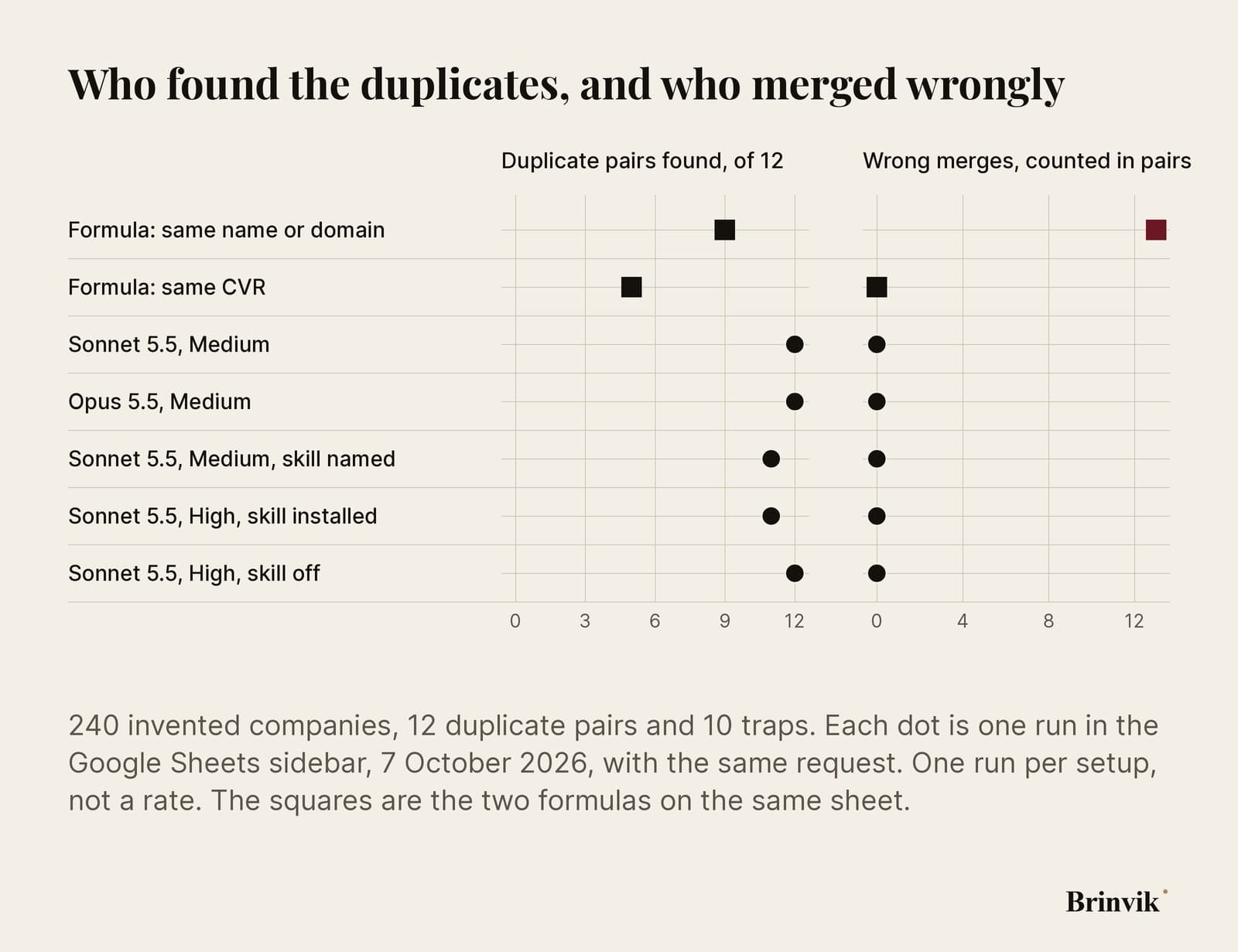
All five runs in the sidebar kept the right-hand side at zero. So did the CVR formula, but it only found five.

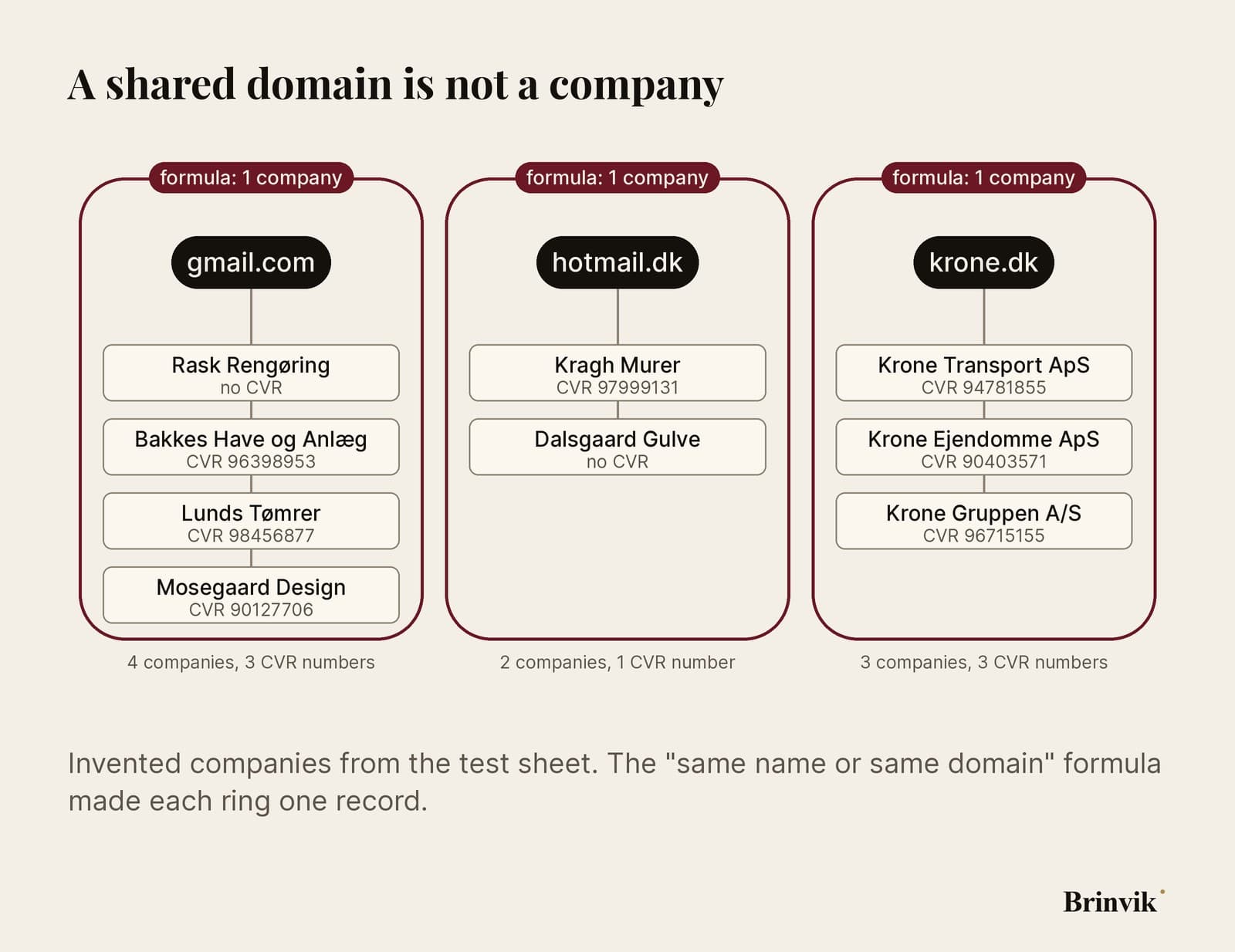
A shared domain isn't the same company
A common formula merges rows when the name is the same or the domain is the same. On the test sheet it found 9 of the 12 pairs and merged 13 pairs wrongly.
It fell into four kinds of trap. Small firms with gmail.com or hotmail.dk as their domain were merged even though they have nothing to do with each other. Krone Gruppen and two subsidiaries share krone.dk but each has its own CVR number, and they became one record. And Nordisk Plast A/S was merged with Nordisk Plast Holding A/S, the holding company above it.
The fourth was the same name in two cities: Hansen VVS in Odense and Hansen VVS in Aalborg became one record, and so did two painters with the same name in Vejle and Holstebro. Meanwhile the formula missed three real duplicates because the names weren't identical: Aarhus Tagdaekning written with and without the Danish letters, Hedegaard Maskiner spelled two ways, and Lindholm Data, which had renamed itself Nordvind IT and kept its CVR number.
None of the runs in the sidebar fell into those traps. All five named the Krone companies and Nordisk Plast as pairs they had kept apart on purpose, because the CVR numbers differ.

The CVR formula is safe and finds five
The safe formula is dull: merge only rows with the same CVR number, once you've stripped out DK, spaces and dots. It found 5 of 12 and merged nothing wrongly. It can't see the rest, because one of the two rows has no CVR number. That's the row from the web form, the email sync or the trade fair list.
The last seven pairs need judgement: that a ventilation firm typed once with the Danish letter and once as "oe", on the same domain, is one company; that Kvist Logistik is in there three times; and that "Jensen's Bageri" and "Jensens Bageri" are one bakery. That judgement is what you use Claude for.
Sonnet 5.5 on Medium found 12 of 12 in a minute and a half and asked once for permission to run a script that wrote the result to a new tab. Opus 5.5 on Medium also found 12 of 12, but took three minutes and asked three times, including for a script that only read the sheet. Afterwards Opus read its own result back. Neither merged anything wrongly. Opus ran second and could read Sonnet's line in the log tab, so the two runs aren't independent.
Both pointed at the same pair as the uncertain one: the rename from Lindholm Data to Nordvind IT. "It's probably a renamed company, so check it before merging," Sonnet wrote (translated from Danish). With one run each you can't crown a winner. You can see that the slower model didn't find more than the faster one on this job. That fits the Sonnet 5.5 vs Opus 5.5 test: pick the model by the job.

An installed skill gets used, even when you don't ask for it
The obvious next step was to write the Danish rules down. Claude Code wrote a skill, crm-dedupe-dk: the CVR number is the company, different CVR numbers are never merged, the three Danish letters are compared with their two-letter spellings, and gmail.com says nothing about a company. The skill went into my Claude account, and then it showed up in the sidebar.
With the skill named in the request, Sonnet found 11 of 12 and merged nothing wrongly. It also wrote down which record to keep and which to merge into it, as the skill asks. The pair it held back was Skovgaard Revision I/S and Skovgaard Revisionsfirma: same domain, but the names don't match, and one row has neither a CVR number nor an address. It "should also be checked by hand", Claude wrote (translated from Danish).
The next run didn't name the skill. Sonnet opened it on its own anyway, followed its rules and held back the same pair. Only once the skill was switched off in the account did Sonnet merge Skovgaard again and find 12 of 12, with a note that the pair "should be confirmed" (translated from Danish). That was right: the two Skovgaard rows are the same company.
So the skill made Claude more cautious, and that cost one real duplicate. The trial runs in Claude Code showed the same: with no CVR column in the file, Sonnet found 8 pairs with the skill and 11 without. So check which skills are switched on in your account before you hand the sidebar a job, because they get used without being named. And use the skill as your checklist when you read the suggestions. It's in the zip.

The first test sheet was too easy
Claude Code built the test sheet and ran 20 trials on it before anything went near the sidebar. In the first version, every duplicate pair shared an address, and Sonnet found every one without a skill by leaning on the address. A duplicate rarely looks like that. The second row comes in through another door, a web form or an email sync, with no address.
The sheet was rebuilt so that in eight of the ten duplicate groups one row has no address or a different one, and two traps were added: three firms in the same office share, and two firms with nearly the same name at the same address. An export from Danish Excel, with semicolons, Danish column names and CVR numbers written with dots, changed nothing for Sonnet with the skill. The second sheet is the one that went into the sidebar.
There are two caveats on the sidebar numbers. There's one run per setup, so 12 against 11 isn't a difference between models. And only the first run was blind. The sidebar keeps a shared log tab in the spreadsheet, Claude Log, and from the second run on Claude read it before it started. The log named the pairs earlier runs had kept apart. If you test this yourself, use a fresh sheet for every run.
That's why the test sheet is in the zip: 240 companies, the answer key and a small script that counts how many duplicates a list found and how many pairs it merged wrongly. Run your own model and your own skill on it before you give them your own customer list.

How to read a proposed merge
Ask Claude to put its suggestions on a new tab with a reason for each merge, then read them against the tree below.
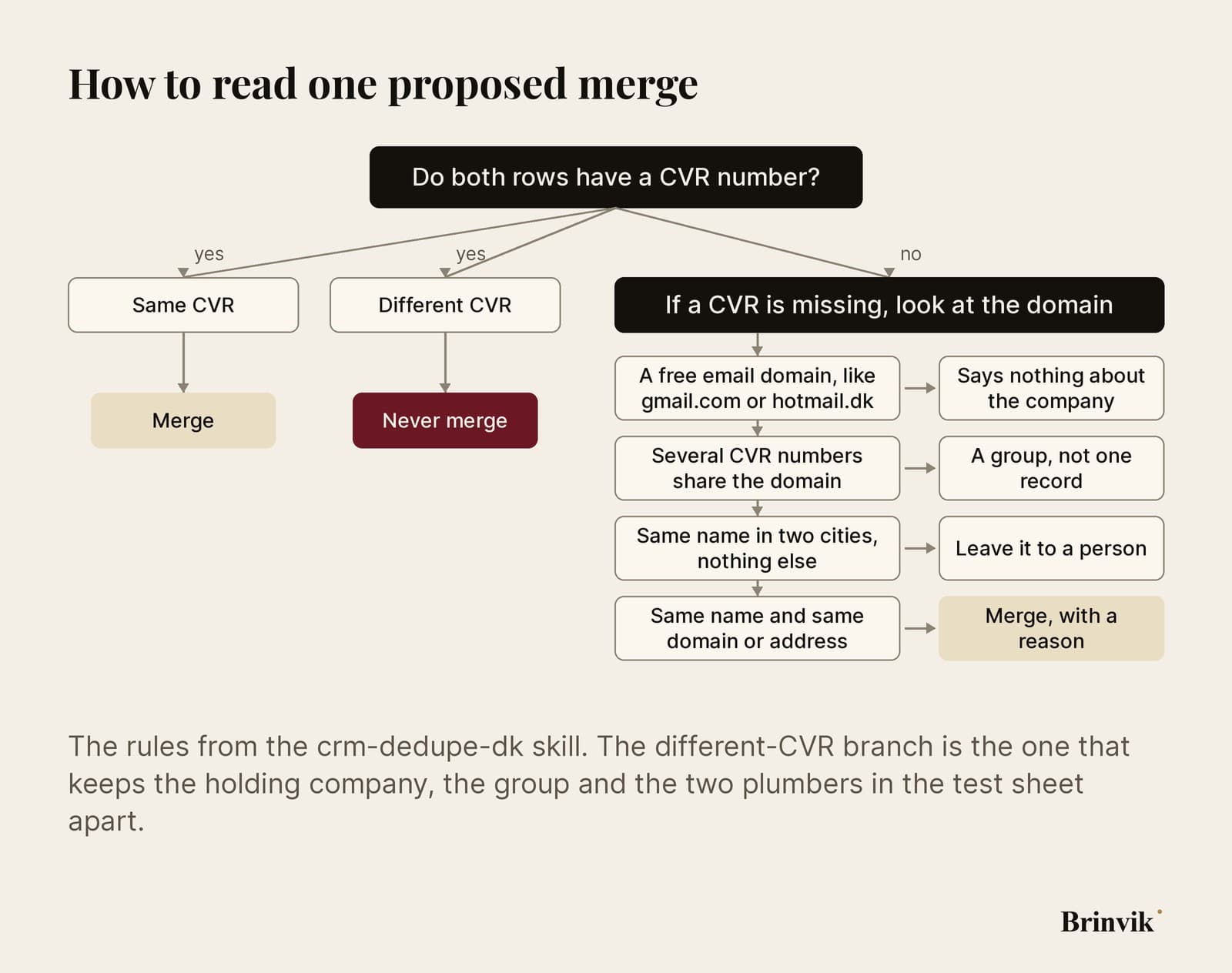
That's the branch the formula skipped when it merged Nordisk Plast A/S with Nordisk Plast Holding A/S: same domain, two CVR numbers. Claude kept them apart in all five runs and said why.
Read what Claude says about its own work, too. All five answers said that all or part of the result hadn't been read back after it was written to the sheet. That's honest, and it's a reason to look yourself. When the card asks for permission, press Allow once rather than Always allow, so you see each change before it happens. Run big lists in batches, because according to Anthropic's guide Google stops a single operation after six minutes.
Before you put the customer list in the sidebar, check your plan. On Team and Enterprise your data processing agreement applies; on Pro and Max, the consumer terms. According to Anthropic's guide, inputs and outputs are deleted within 30 days. The extension doesn't inherit custom retention settings your organisation may have set, and zero data retention isn't available in the beta. A customer list with contact people is personal data, so decide which columns go in. To find duplicate companies, Claude needs neither your contacts' names nor their email addresses.

Internal AI tools start with the rules in your CRM
As an AI consultant, I set Claude up for sales and RevOps teams. The hard part is the rules for your own fields, whichever CRM you run: where the CVR number lives, or whether it's there at all, which domains cover a group of companies, and who gets to approve a merge. I write those rules as a skill, test it on a sheet with your own traps, and set it up so the whole team has the same skill and the same model in Claude for Google Workspace.
That's part of my internal AI tools work, and it's the kind of AI for revenue operations that saves time without costing a customer's history. Send me the column names from your export, without the customers, and I'll tell you what the rules need to handle.
FAQ
Frequently asked questions
Not inside the CRM. With Claude for Google Workspace, Claude works on an export in Google Sheets and suggests which rows are the same company. In this test, Sonnet 5.5 and Opus 5.5 found 11 or 12 of 12 duplicate pairs in five runs in the sidebar, without a single wrong merge. You do the merging in your CRM afterwards.
It depends on the system. In HubSpot, two records can't be separated again once they're merged, HubSpot says itself. Check what your own CRM can do, and read the suggestions before they become merges.
In this test, Sonnet 5.5 and Opus 5.5 found the same number of duplicates, and neither merged anything wrongly. Sonnet on Medium finished in half the time. That's one run each, and Opus ran after Sonnet, so test the model you have on a sheet where you know the answer.
Yes, it did in this test. Sonnet 5.5 opened an installed skill without being asked and followed its rules. The skills in your Claude account are available in the sidebar, so check which ones are switched on before you hand it a job.
That depends on your plan and your data. On Team and Enterprise your data processing agreement applies; on Pro and Max, the consumer terms. According to Anthropic, data is deleted within 30 days, and zero data retention isn't available in the beta. Claude doesn't need your contacts' names or emails to find duplicate companies, so leave them in the CRM.
Claude for Google Workspace is in beta on Pro, Max, Team and Enterprise. You install it from the Google Workspace Marketplace, or your Google admin installs it for the whole organisation. Then you'll find Claude under Extensions in Docs, Sheets and Slides.