Claude Tag can now use your own connectors when you ask Claude something in a Slack channel. The first time it happens, a message appears in the thread that only you can see. It has three buttons: Allow, Allow with review and Don't allow. The rest of the channel never sees the three buttons.
Anthropic launched the feature on 24 September 2026. It's rolling out on the Team plan first, with Enterprise to follow. Claude Tag is still in public beta, and Anthropic's own documentation says not every organisation has the feature yet.
TL;DR: Until now, Claude in a channel could only use the tools an admin had attached to that channel. Now it can also use your calendar, your drive or your slice of the CRM for a task you asked for yourself, and the answer lands in the channel where everyone can read it. Anthropic's own sensitive-content check doesn't consider who else is in the channel. That turns your Claude integration in Slack into a decision you make tool by tool: does the tool belong in the channel's shared access, or should it follow the person?

What Claude Tag can reach now depends on who's asking
In a channel, Claude Tag works under its own service accounts, not as you. An admin attaches the tools to the channel, and everyone who writes to @Claude in there gets the same access. Anthropic spells out the benefit in its documentation on Claude's identity: "What Claude can do never changes based on who asked."
That still holds for the channel's own work. It no longer holds for your task. Ask for something that needs one of your own tools, and Claude can now fetch it through your connector, with your permissions, and put the result in the thread.

Two things don't change. Nobody else in the channel can use your connectors. If a colleague writes in your thread, their request runs on the channel's own access, and Anthropic says Claude is designed to take direction from you and to read other people's messages as information about the task.
And routines, the tasks Claude runs on a schedule or starts on its own, always use the channel's tools. Never yours.

Your Claude integration: does the tool stay in the channel or follow the person?
Everyone in a channel can use whatever an admin attaches to it. Anthropic says so in its security documentation: whatever the connected account can read or write is "available to every member of those channels". That's why Anthropic recommends a dedicated account for Claude in each tool rather than someone's personal login.
In the blog post about the feature, Anthropic also says most organisations keep the channel's list short on purpose, because they want access to follow the person, not the channel. Until now that was all or nothing. Either the tool went into the channel for everyone, or Claude couldn't use it there at all.
Now there's a middle way, and Anthropic lists the options itself: a shared set of tools under Claude's own identity, personal connectors only, or a decision tool by tool.
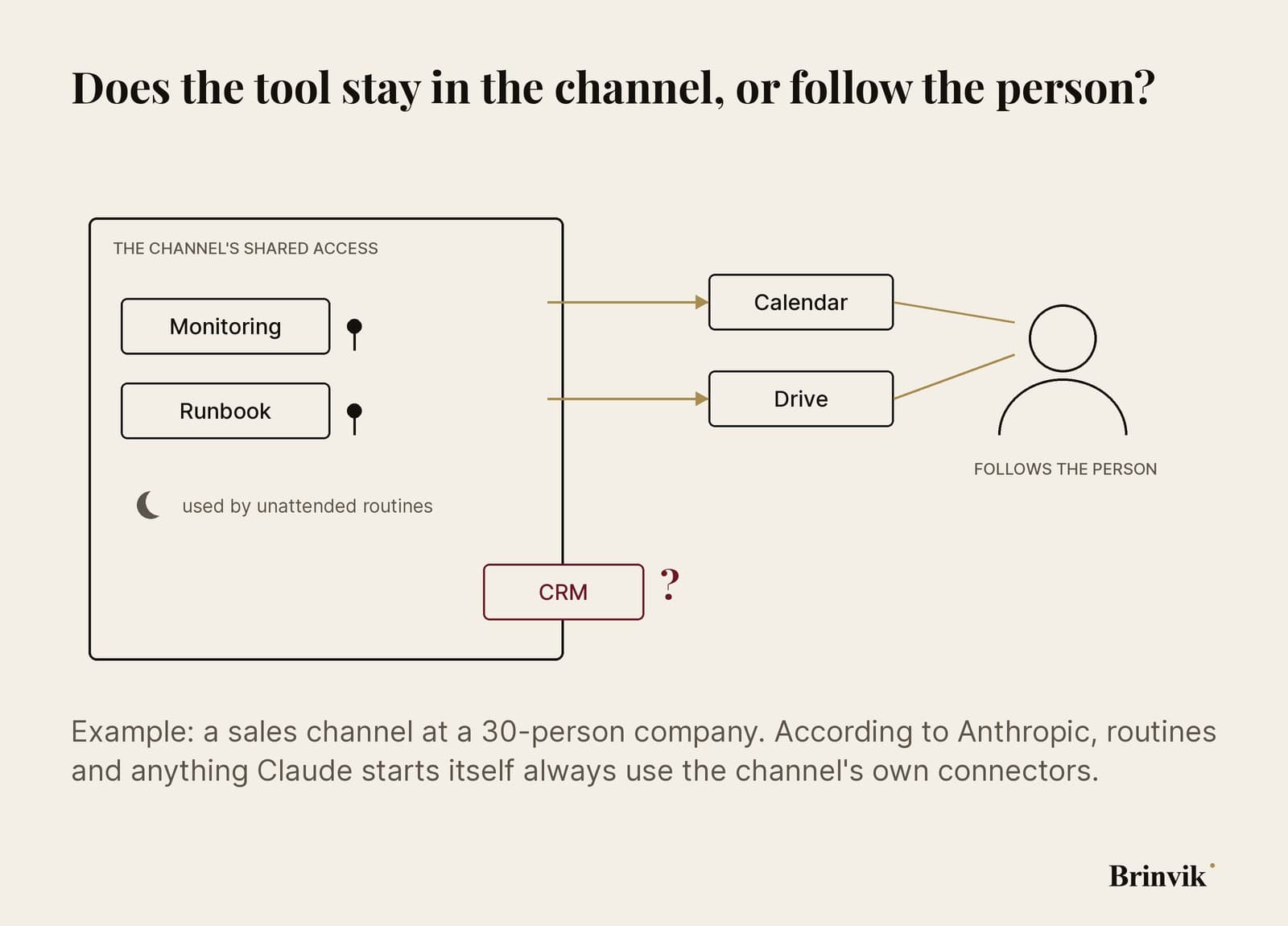
Take a sales channel at a 30-person company. The example is mine. The calendar has no reason to sit in the channel, because everyone has their own. The same goes for the drive, where each person can already open only what they have access to.
The CRM is harder. If the channel runs on one login that can see every customer, anyone in the channel can get Claude to pull every customer. Move the CRM onto each person's own connector, and every salesperson sees only their own accounts, exactly as they do in the CRM itself.
You can empty the channel's shared access completely. But then routines have nothing to work with, because personal connectors don't run unattended. Anthropic says a channel that relies only on personal connectors "suits closely supervised work".

Three buttons only the person asking can see
According to Anthropic's guide, you get three choices:
- Allow starts the task in auto mode. Claude uses your connectors as needed and only checks with you before posting something that looks sensitive.
- Allow with review shows you every single result before it's posted to the channel.
- Don't allow turns down this one request. A later request can ask you again.
Below the buttons there's a checkbox, "Use this choice for future requests". Tick it and the choice is saved for every channel, and Claude stops asking. You can change it later on the Home tab of the Claude app in Slack, which offers Auto mode, Ask every time and Allow with review. Ask every time is what you have until you save something.
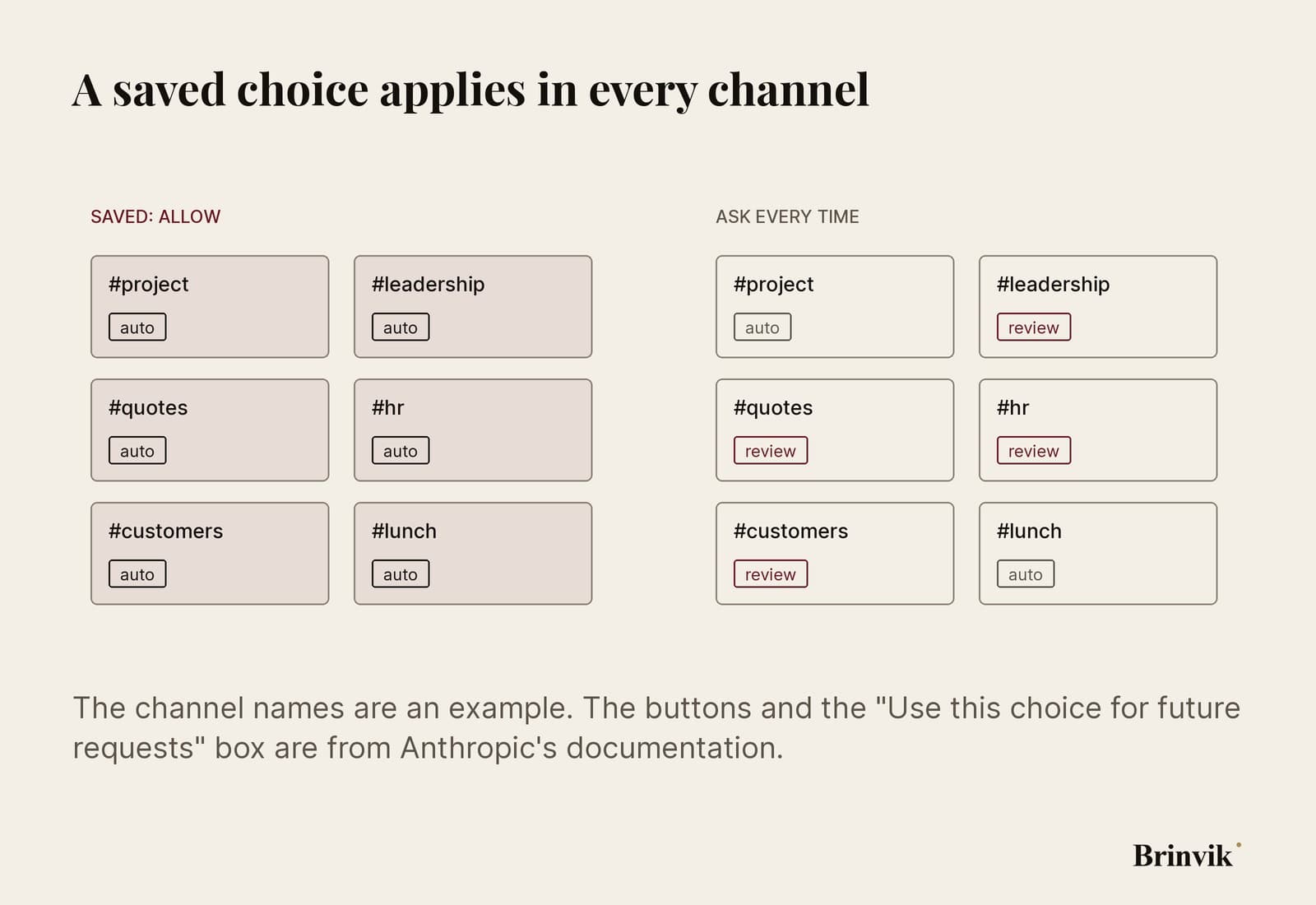
My advice is to leave the box unticked. Ask every time lets you decide channel by channel: auto in your own project channel, review in the channel with the leadership team. A saved Allow also applies in the channel you weren't thinking about when you ticked the box. If you do want to save something, save Allow with review.
If a task is doing something you don't want, there's a Stop button under Claude's message in the thread. Only you can see it.

The check reads the answer, not who's in the channel
If you choose Allow, Claude checks every result before posting it. Anthropic lists ten kinds of content the check holds back for your approval. They include credentials and keys, personal identifiers, pay and HR records, customer and deal information, unannounced plans and health information.
In Anthropic's own words: "The check is a screen, not a guarantee, and it doesn't consider whether other people in the channel have the same access you do."

Picture a salesperson in #quotes who uses her own CRM connector to ask Claude for last year's price for one customer. A price is commercial information, so the check should hold it back, and she sees it before it's posted. The number's right, so she approves it. The channel has twelve members, and three of them don't work in sales. Nothing in the message told her that, and she checked the number, not the audience.
So review only helps if you know who's reading.
If the answer contains personal data from your inbox or your slice of the CRM, it now has more readers than it had in the tool. That happens inside the company, but it's your name on it: Anthropic says everything Claude does through your connector is recorded in that tool's own log under your account, while the channel's work sits under the service account.

Who reads the answer?
By default the room is internal. According to Anthropic's guide to access, Claude is switched off in channels with guests until an admin changes the setting, and it doesn't work at all in a Slack Connect channel shared with another company. If an owner does allow Claude in a channel with guests, the guests can read what Claude posts.
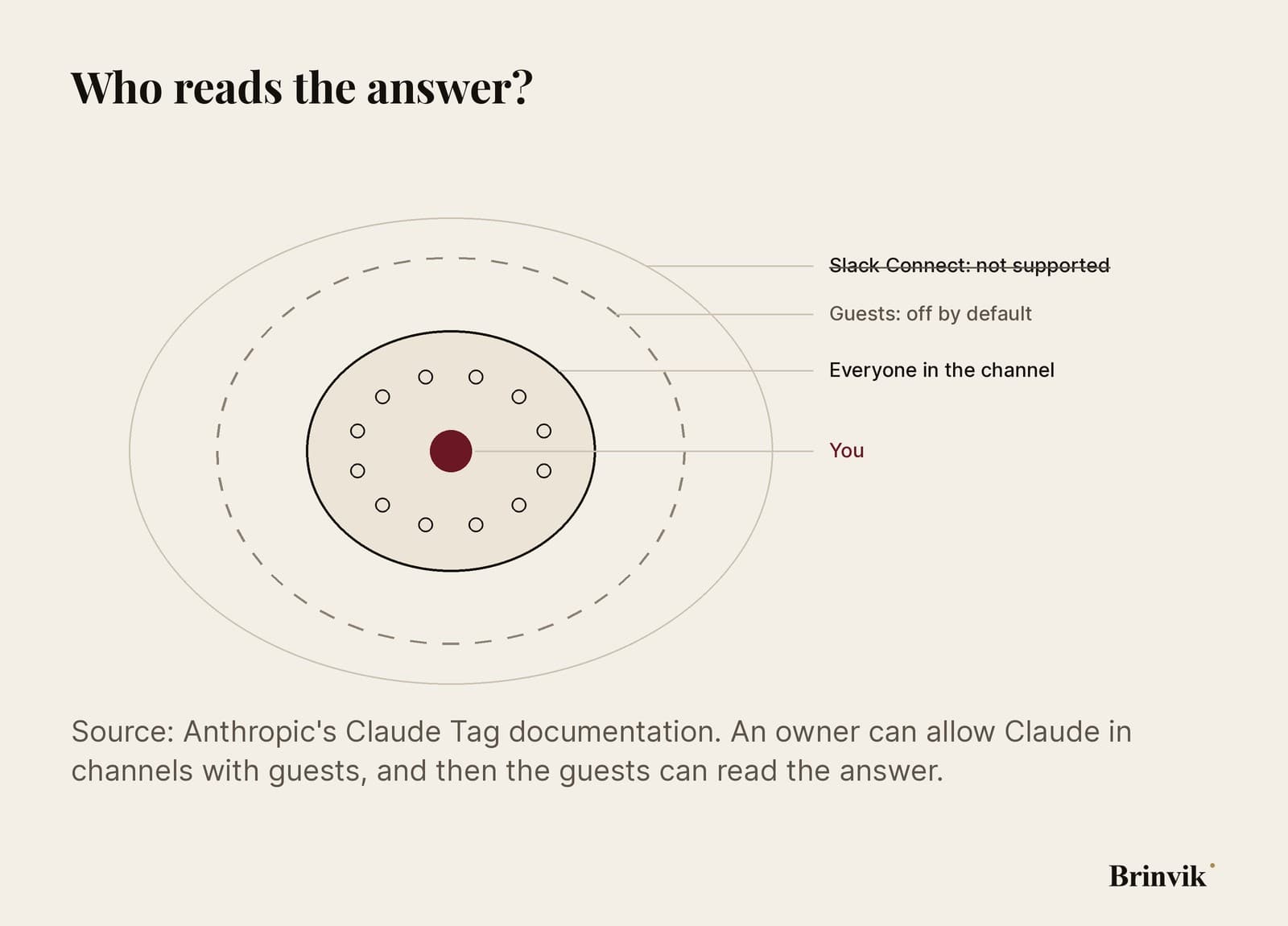
So the readers to think about are the colleagues who are in the channel for entirely different reasons.
On the Team plan you have two tools that shape the room: a setting that restricts Claude Tag to your organisation, and channel name patterns that keep Claude out of particular channels, whoever invites it. The documentation also describes an Enterprise setting, Delegated task results, that lets an owner require review for everyone. Enterprise gets personal connectors after Team. I've written about how the two plans differ on settings like these in the article on Claude's memory and its defaults.

Whoever asks is now the editor
The three-button message reaches one person. The answer reaches the whole channel. That makes whoever asks the editor for the channel, whether they know it or not.
When you press Allow with review, you're approving two things at once: that the number is right, and that these particular people in the channel should see it. You've always checked the first. The second is new.
As an AI consultant and Claude specialist, I set up Claude Tag for Danish companies. The hard part is going through the channel's shared access tool by tool and deciding what stays and what follows the person, without taking away what the AI agents and routines that run overnight need. I can help you with that as part of an internal Claude setup.
FAQ
Frequently asked questions
Yes, if it's in the answer. Anything Claude posts in a channel thread can be read by everyone in the channel. The work Claude does along the way lives in a session only you can open.
No. Your connectors are only used for tasks you asked for yourself. If a colleague writes in your thread, their request runs on the channel's own access.
Allow starts the task in auto mode, where Claude only holds a result back if it looks sensitive. Allow with review shows you every result before it's posted to the channel.
Open the Claude app in Slack and go to the Home tab. There you can switch between Auto mode, Ask every time and Allow with review.
The documentation describes an Enterprise setting, Delegated task results, that lets an owner require review for everyone, or remove the review option. Personal connectors are rolling out on Team first, with Enterprise to follow.
By default Claude is switched off in channels with guests until an admin changes it. In Slack Connect channels shared with another company, Claude doesn't work at all.
No. Routines and anything Claude starts on its own use the channel's own tools. Personal connectors never run unattended.
The feature is rolling out gradually, and Anthropic says only a limited number of organisations have it so far. If Claude never offers, your organisation may not have it yet.
Sources
- Anthropic: Claude Tag now supports personal connectors in channels (24 September 2026)
- Anthropic documentation: Personal connectors in channels
- Anthropic documentation: How agent identity works
- Anthropic documentation: Security and data handling
- Anthropic documentation: Restrict where Claude Tag operates
- Anthropic documentation: Claude Tag settings map