Open Claude, go to Settings and find Memory. Look at your list of topics before you read on. It takes two minutes, and the rest of this article gets a lot more concrete once you have seen your own list.
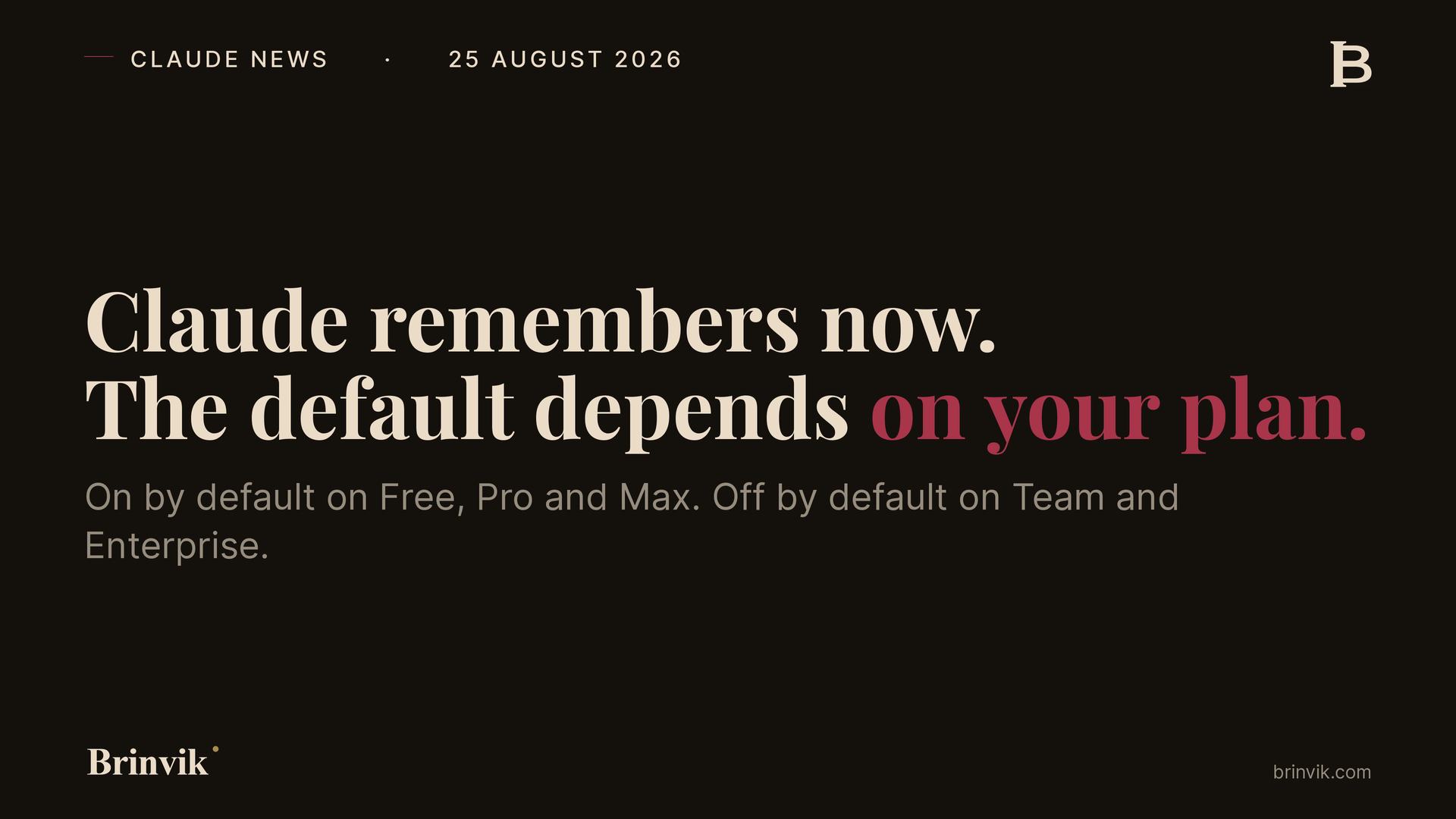
TL;DR: On 25 August 2026 Anthropic shipped a memory that works across chat and Cowork in the cloud. Everything Claude remembers sits as topics under Settings and Memory, and each topic can be edited or deleted. Sensitive topics such as health and beliefs stay out unless the user turns them on. Claude memory is on by default on Free, Pro and Max, and off by default on Team and Enterprise. The detail that creates work inside a company is not in the headline: deleting a conversation does not delete what Claude remembered from it.
It looks like a small product update. It is not, because it moves a decision nobody has made yet into a product your people are already using.
Anthropic, Claude release notes, 25 August 2026 →
What Anthropic actually shipped
The news has three parts and they are worth keeping apart.
First, memory now works across chat and Cowork in the cloud. What Claude learns in an ordinary conversation is also present when the same user starts a task in Cowork.
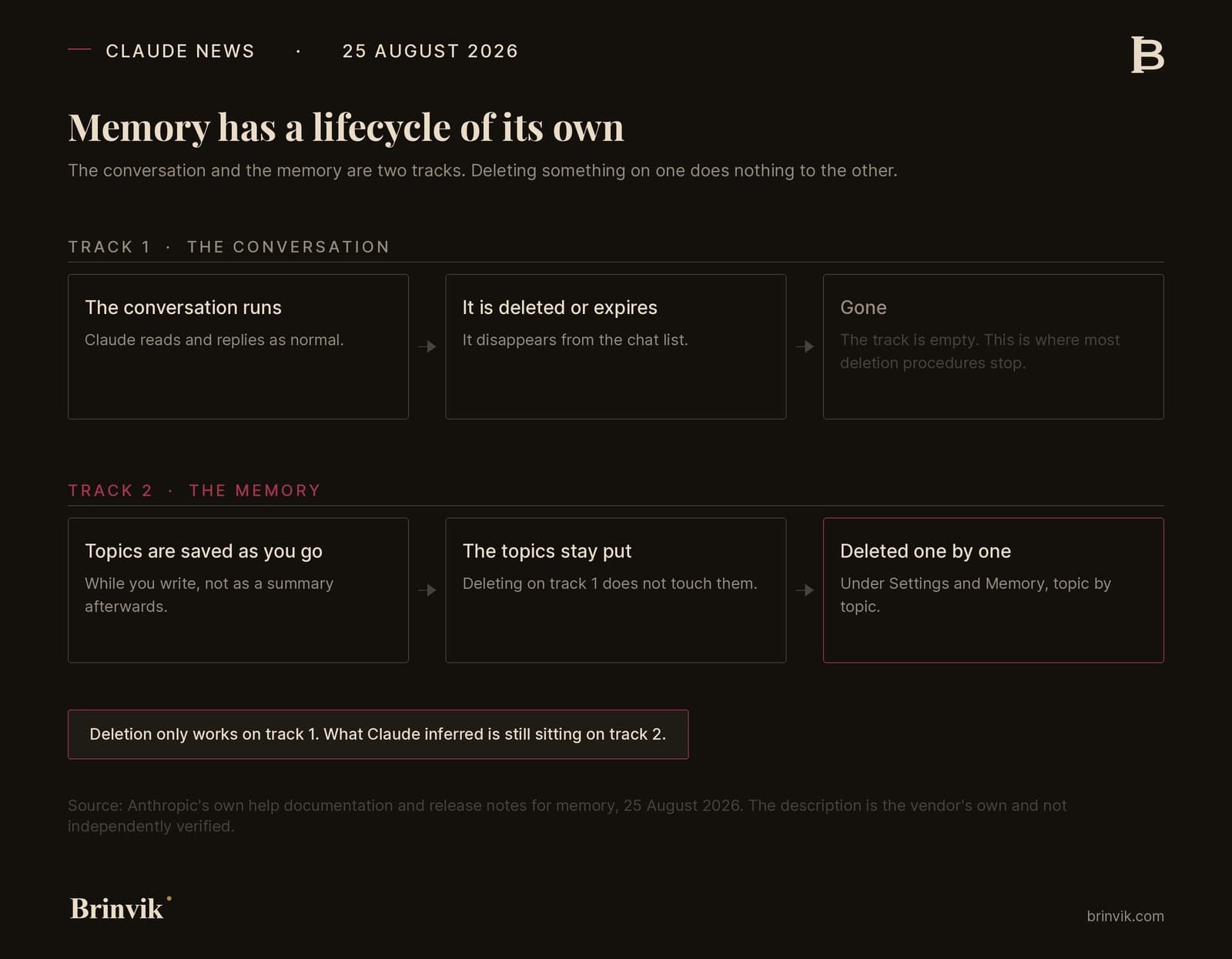
Second, memory became visible. It is no longer a summary Claude writes about a conversation once it ends. It is a list of topics saved as you go. Each topic can be opened, edited or deleted, and the change applies to every future conversation. You can also ask Claude to remember or forget something mid conversation, and it takes effect in the next ones.
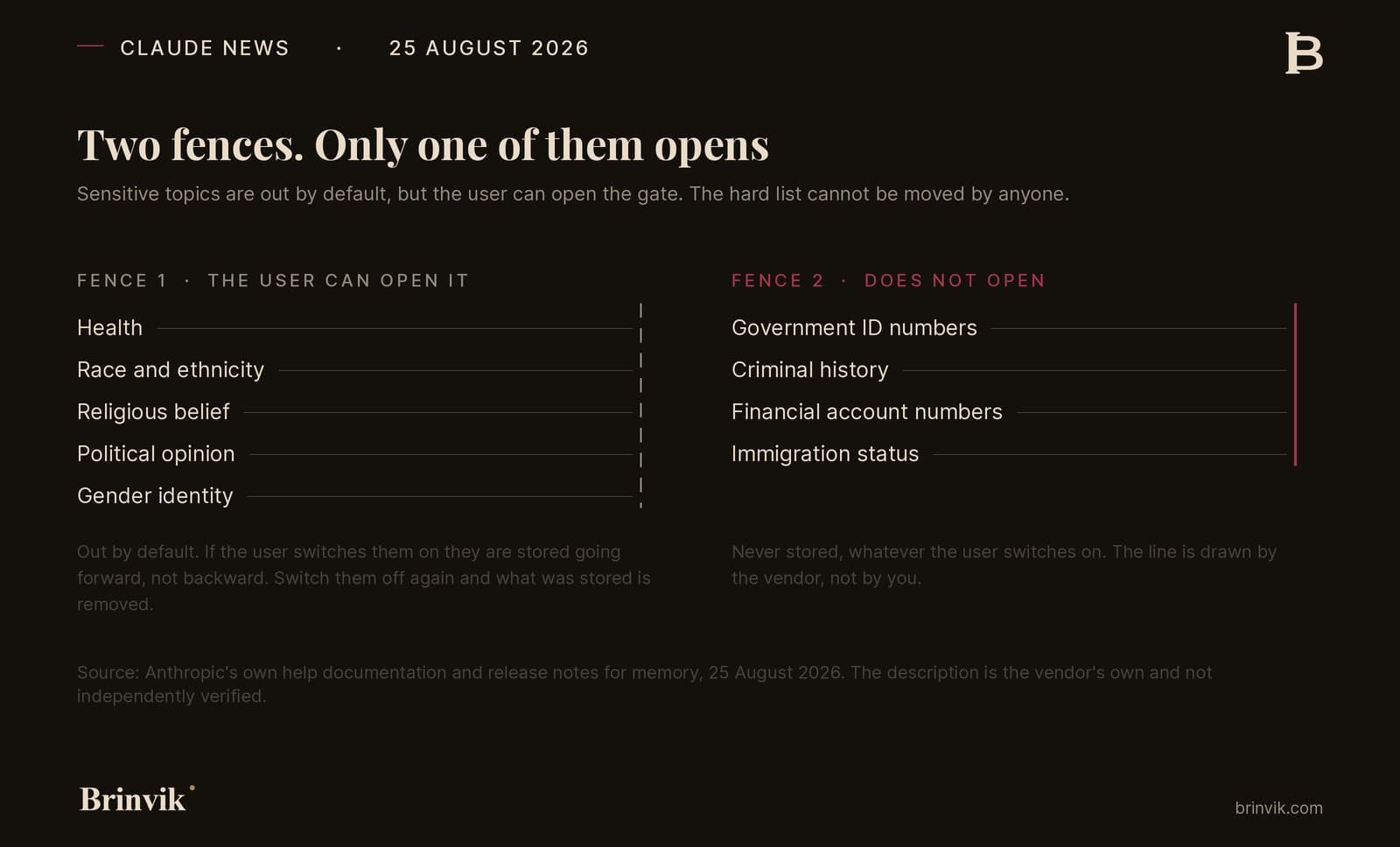
Third, there is a new setting for sensitive topics. By default Claude keeps them out. Anthropic names health, race, ethnicity, religious beliefs, politics and gender identity. A user can turn on "Include sensitive topics in memory", and Claude then saves them going forward, not retroactively. A notice appears each time such an item is saved. Turn the setting off again and Claude removes the sensitive items already stored.
Some information is never saved, whatever the user chooses. Anthropic names government ID numbers, criminal history, financial account numbers and immigration status. That line is hard, and it is drawn by the vendor rather than by you.
All of the above is Anthropic describing its own product. There are no effect numbers, no customer cases and no time saving claims in this release, so there is nothing to caveat. That is rare, and it makes the story easier to read.
The deletion that does not delete
Here is the fact worth taking into a meeting.
When a conversation expires or is deleted, the related memory entries are not removed. They stay under Topics and have to be deleted one by one. Memory has its own lifecycle, separate from the conversations it came from.
For a private user that is an annoying bit of housekeeping. For a company it is an answer that needs rewriting.
The next time you get a deletion request from a data subject and someone in the building answers "we deleted the conversation", that answer may no longer be correct. What Claude inferred from the conversation can still be there. The same applies to the internal clean up many teams do when a client relationship ends.
There is an upside in the other direction. Memory is included in the data export and follows the chat data retention policy you already have. That helps with subject access requests. It also means an export now contains a profile of what Claude inferred about a person over time, not only what the person wrote. Read it before it leaves the building.
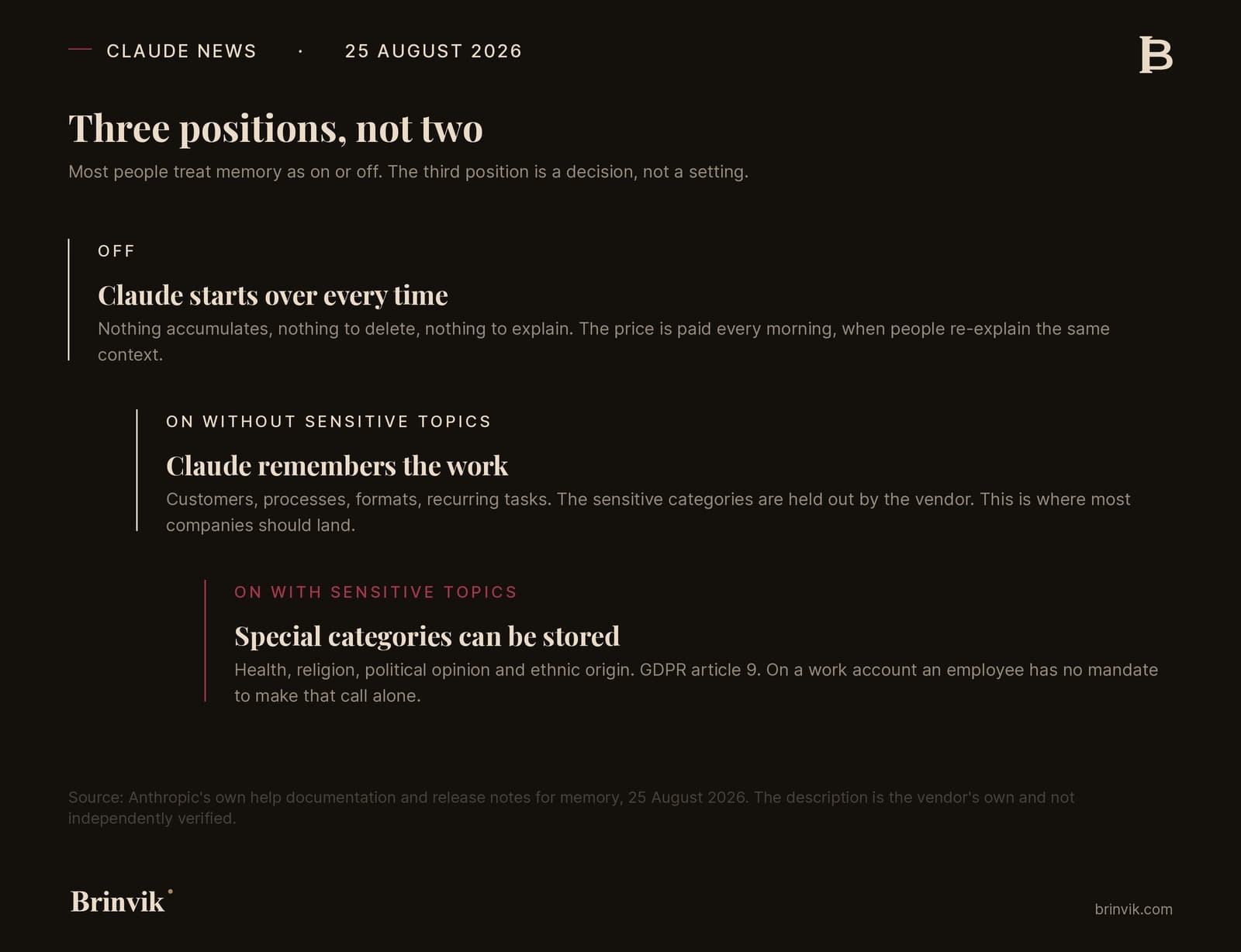
There are three positions, not two
Most people treat a feature like this as on or off. There are three positions and each has its own consequence.
Off. Claude starts from scratch every time. Nothing accumulates, nothing to delete, nothing to explain. The price is paid every morning when people re explain the same context.
On, without sensitive topics. Claude remembers the work. Clients, processes, formats, recurring tasks. The sensitive categories are held out by the vendor. This is where most companies should land, and it is also the position you get when memory is simply turned on.
On, with sensitive topics. Now health, beliefs, politics and ethnicity can sit in a persistent memory. On a personal account that can make sense. On a work account it is a different conversation, and it is not one the employee has the mandate to hold alone.
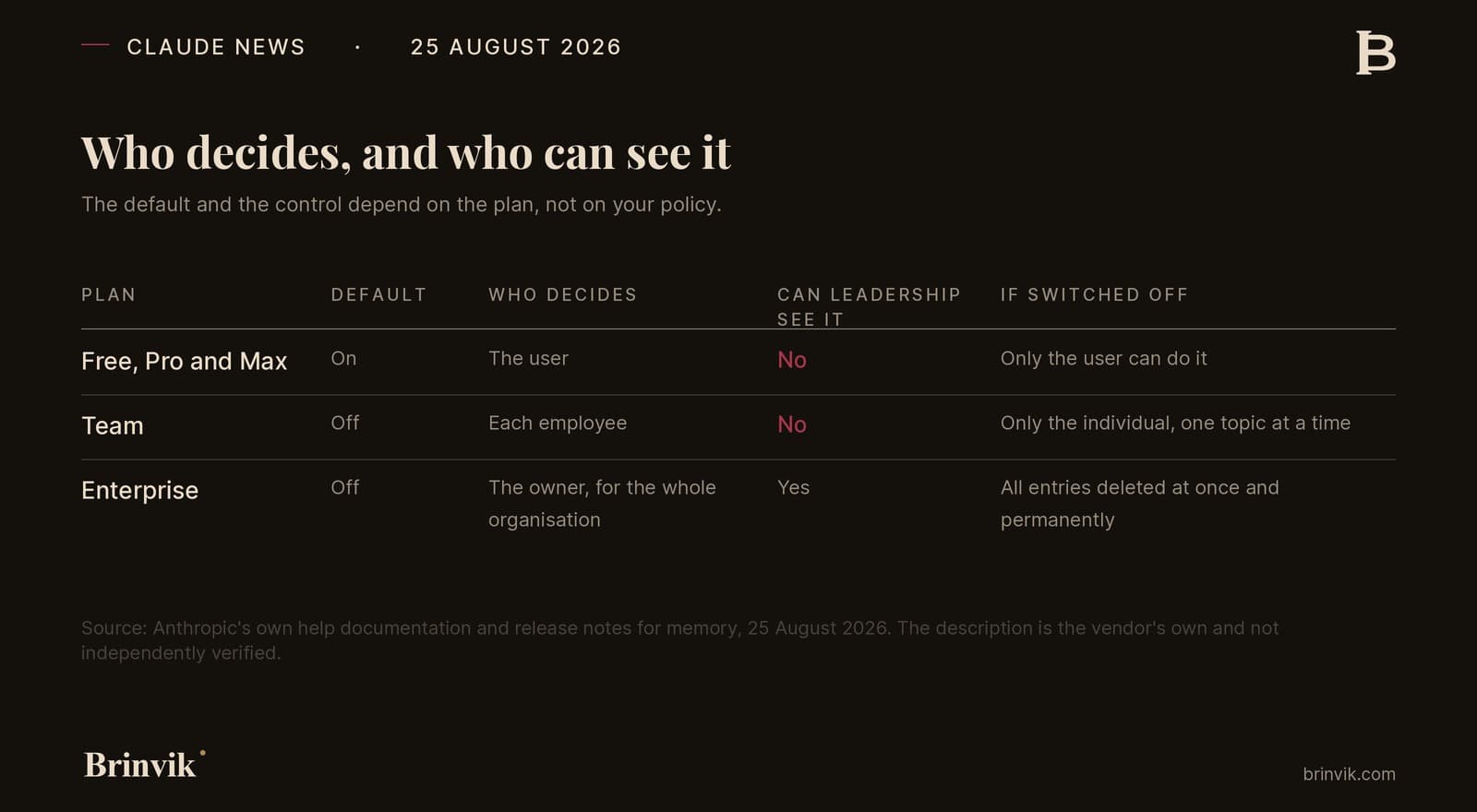
Which of the three you can choose, and who chooses, depends on your plan. That is why the rest of this is organised by plan rather than by role. Inside one plan the decision is the same for an operations lead and a sales lead. Between Team and Enterprise it is very different.
Free, Pro and Max: it is already on
On the three personal plans Claude memory is on by default. That is the most important sentence in the release for a smaller company, because those are the plans people buy for themselves when they want to move fast.
If you have people using their own Pro subscription for work, there is now a persistent memory about your clients, your prices and your way of working, sitting in an account you do not administer. You cannot see the topics. You cannot delete them. You cannot export them if the person resigns, and you cannot document to an auditor that they do not exist.
This is not a new risk. Shadow IT has always been there. What is new is that it became durable. Context used to disappear when the tab closed. Now it stays.
Team: you can write the policy, you just cannot enforce it
On the Team plan memory is off by default and each member manages their own setting. There are no organisation level controls.
Read that again if you are on Team and have an AI policy. You can write in the policy that memory must be off. You cannot enforce it in the product. You cannot see who turned it on. You cannot turn it off centrally afterwards.
This is not a security hole. Nobody outside gets access to anything that was not already theirs. It is a control gap, and the two get confused every time somebody fills in a vendor questionnaire or sits across from an ISO 27001 auditor. The question in the questionnaire is rarely "can others see the data". It is "can you document who is able to change the setting". On Team the honest answer is no.
Enterprise: the owner holds the switch, and it deletes
On Enterprise the owner turns memory on for the whole organisation under Organization settings and Capabilities.
The switch in the other direction is worth understanding before anyone touches it. When an owner turns memory off for the organisation, all existing memory entries for all users are deleted immediately and users can no longer see the setting. Anthropic states that it permanently deletes all memory data for everyone in the organisation.
From a data protection standpoint that is the right behaviour. It is also a button a well meaning IT lead can press on a Friday afternoon and remove six months of accumulated context for the whole company. Write down who is allowed to press it and what has to happen first. Ten minutes now, impossible to undo later.
GDPR: three decisions, not a footnote
There are three concrete things to settle, and they connect.
Special categories behind a user button. Health, beliefs, political opinion and ethnicity are special categories of personal data under GDPR article 9, the strictest category there is. Anthropic keeps them out by default, which is the right call. But on the personal plans and on Team it is the individual user who can turn them on. If that user is your employee and the information concerns a client, a colleague or a citizen, it is not the employee's data to consent about. You are the controller, even when the button sits somewhere you cannot reach.
Deletion does not mean the same thing in two places. See the section above. This belongs in your deletion request procedure, not in somebody's head.
The export now contains a profile. Subject access gets easier to satisfy and more revealing at the same time. Decide who reads an export before it leaves the building.
Here is my view: the Team plan should not be sold as the governed option
The Team plan is often recommended to smaller companies as the natural step up from personal subscriptions. That step makes sense for billing, for sharing and for support. It does not make sense for governance.
A plan where each employee decides whether a persistent memory is on, and where management can neither see nor change it, is not a governed platform. It is a set of personal accounts with a shared invoice. That is fine as long as you know it, and it is not fine if you have written something else in a tender response.
I sell advisory work and Claude rollouts to companies, so I have a commercial interest in recommending the more expensive plan. Read my view with that in mind. I say the same thing to the clients who end up staying on Team, and then we write the policy to match what the product can actually do: a rule, some training and a spot check, instead of a control that does not exist.
The default setting is the policy that actually applies
Still my judgement, not a legal provision.
Most AI policies I am asked to review describe what employees should do. Very few describe what the product does if nobody does anything. The second one decides what happens in practice, because the vast majority never open a setting.
That is why this release matters more than its size suggests. Anthropic made four choices on your behalf: memory on for personal plans, off for company plans, sensitive topics out by default, and a hard list of things never stored. Three of them are conservative and good. The fourth, that personal plans start switched on, is exactly where your shadow IT lives.
Write your policy from the defaults rather than from ideal behaviour. Then it matches reality the first time.
Your memory position on one page
Not a long checklist. Five lines to fill in today and keep somewhere an auditor can find them.
- Which plan are we on, and how many people use something else alongside it.
- What is the default on that plan, on or off.
- Which of the three positions do we choose, and why.
- Who is allowed to change it, and where is that written down.
- What do we tell our people, and when do we tell them.
If you cannot fill in line four, that is where you start. Not with the feature.
The sentence I would put in the policy myself
If you take one thing from this, take this and write it in wherever your AI rules live. Adjust the names and the wording to fit you.
"Claude's memory may hold work related context. It must not hold health, beliefs, political opinion or ethnicity about anyone, including yourself, when you are using a company account. The setting is changed only by the IT lead, and deleting a conversation does not delete the memory."
Write it while the feature is new. Not when somebody asks.
If you need to work out which position is right for you, and get it written somewhere that survives a security questionnaire, that is the work I do. See internal AI tools or write to me directly.
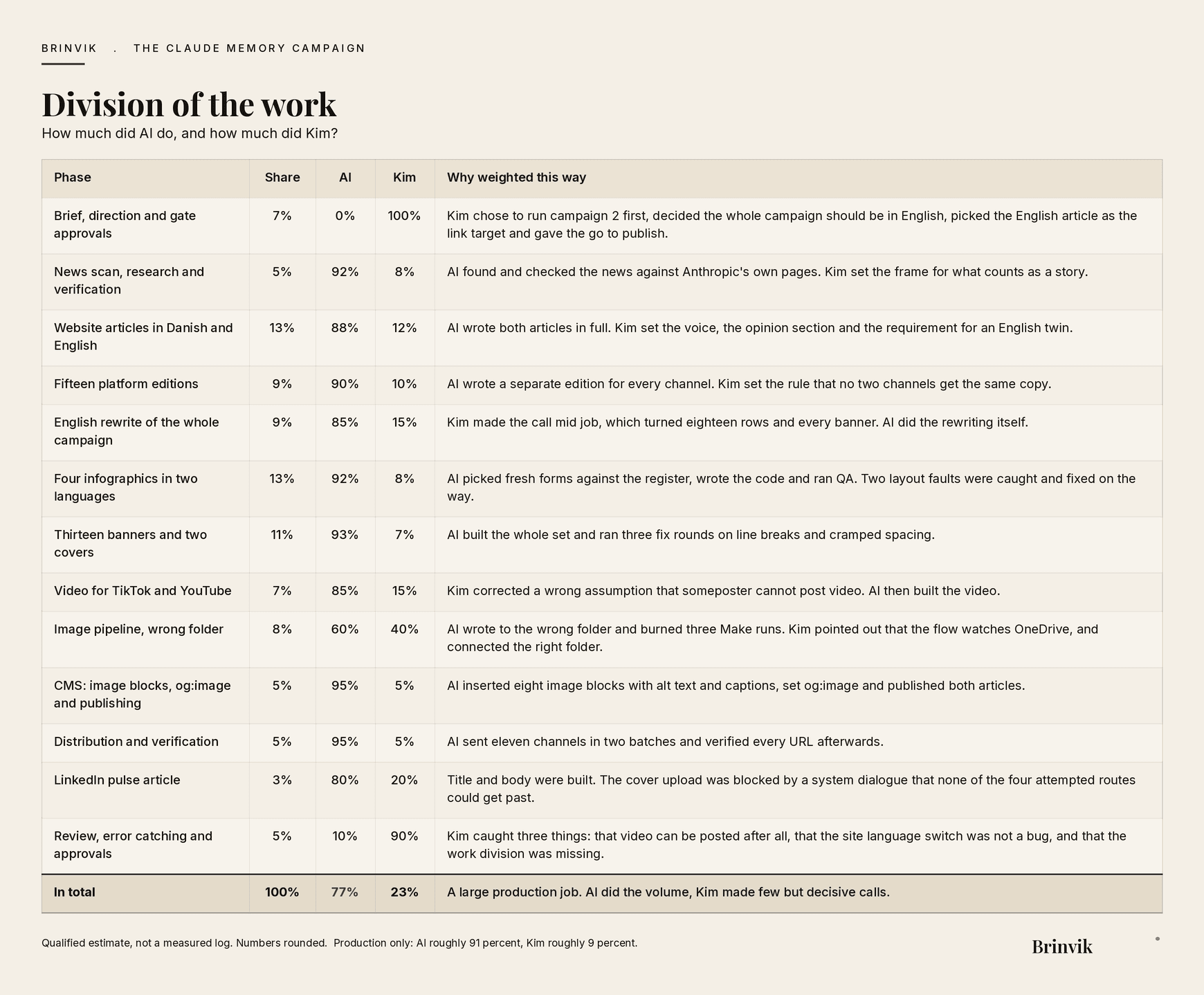
Division of the work
This article and the campaign around it were made in collaboration with AI. Overall: AI roughly 77 percent, Kim roughly 23 percent. Looking at production alone, meaning what was actually written, drawn and sent, AI accounts for roughly 91 percent and Kim for roughly 9 percent.
AI wrote both articles, built eight infographics, thirteen banners and a video, and sent eleven channels out. Kim made the calls that changed direction: running this campaign first, switching the whole campaign to English mid job, and correcting three specific errors along the way.
The numbers are a qualified estimate, not a measured log.
Sources
Primary sources:
- Claude release notes, 25 August 2026
- Use Claude's chat search and memory to build on previous context, Anthropic Help Center
Every factual statement in this article comes from Anthropic's own pages. No third party claims are involved.
FAQ
Frequently asked questions
Claude saves topics from your conversations as you go and uses them in future conversations. The topics sit under Settings and Memory, where you can edit or delete them one by one. Since 25 August 2026 memory works across chat and Cowork in the cloud.
It depends on the plan. On Free, Pro and Max it is on by default. On Team and Enterprise it is off by default, and on Enterprise the owner is the one who can turn it on for the whole organisation.
No. Anthropic states that memory entries are not removed when a conversation is deleted or expires. You have to delete the individual topics under Settings and Memory.
Not by default. Those are kept out unless the user turns on "Include sensitive topics in memory". Turn the setting off again and Claude removes the sensitive items already saved.
Yes. Anthropic names government ID numbers, criminal history, financial account numbers and immigration status. Users cannot change that line.
No. On Team each member manages their own setting and there are no organisation level controls. Central control exists only on Enterprise.
On Enterprise all existing memory entries for all users are deleted immediately and users can no longer see the setting. It cannot be undone.
Health, beliefs, political opinion and ethnicity are special categories under article 9. When an individual employee can switch them on inside a work account, the company is still the controller. Deletion procedures also need to cover memory separately from conversations.