TL;DR. On 6 August 2026 Anthropic opened automatic security scanning for third-party skills and plugins. It checks the contents when someone uploads or edits them, and answers pass, warn or blocked. It is in beta, it exists only on Enterprise, and it is off by default. Five different kinds of skill can sit in your Claude setup. The scan touches one of them.
I work with Claude for business every day, and I started by sorting my own setup the way the scanner does. That exercise is what the rest of this article is about, because you can run it in your own company this afternoon, whatever plan you are on.
Anthropic's own documentation: Get started with skill and plugin scanning →
I counted my own skills
In the session where I wrote this article, Claude had 42 skills I had built or saved myself, and 20 installed plugins. Together that made roughly 168 skills available at once.
I did not download 168 things one at a time with a decision attached to each. I installed a handful of plugins, and each one brought a bag of skills in with it. That is how it works in practice, and it is how it works at your company too.
It is worth holding on to what a skill actually is. It is a file of instructions that Claude reads and follows. Not a program you can watch running in the background. Not something that pops up asking for access while you look on. A text file your AI treats as an order.
Put those two things together and you get a conclusion most people have not faced yet: you already have a supply chain inside your AI tool. Other people's instructions run in your company, on top of your data. You just never called it a supply chain, because it did not look like software when it arrived.
What Anthropic actually opened
From the release notes of 6 August 2026: Enterprise plans can now switch on automatic security scanning for third-party skills and plugins. It applies in Claude, in Claude Cowork and in Enterprise plugin marketplaces.
The mechanics are simple. When someone in the organisation uploads or edits a third-party skill or plugin, Claude reads the contents and returns one of three answers. Most scans take one to two minutes. Results are cached, so the same file answers instantly next time. It costs nothing extra, and it is switched on by an Owner or Primary Owner in organisation settings. After that it can be narrowed further with custom roles, so scanning applies only to certain roles.
The three answers are not equally serious, and the difference is worth knowing before someone is holding a blocked skill and a deadline.
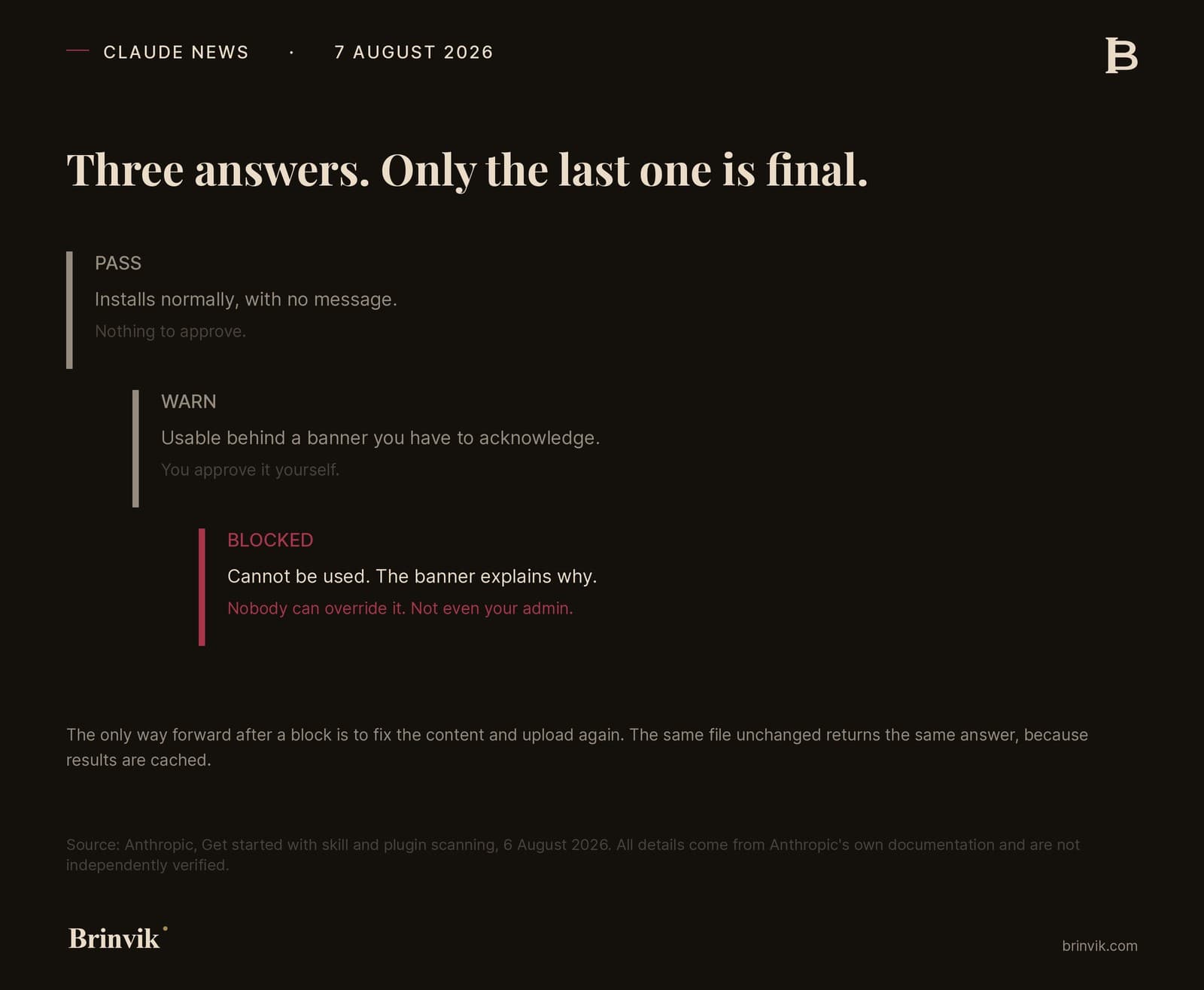
Pass means the skill installs normally, with no message. There is no ceremony and nothing to approve.
Warn means Claude could not fully verify the skill. It stays usable, but behind a banner you have to acknowledge. Anthropic's own wording is that it may carry risk depending on where it came from. So it is not an accusation, it is a missing confirmation, and the decision sits with you.
Blocked means the scan found malicious content. The skill cannot be used, and the banner explains the specific reason. Here is the detail I think will surprise most people: the person who uploaded it cannot override the block, and admins cannot approve a blocked skill either. Anthropic writes "at this time", so it is probably temporary, but right now that is how it works. The only way forward is to fix the content and upload again. Upload the same file unchanged and you get the same answer, because the result is cached.
Sort your own skills the way the scanner does
This is the exercise, and it is faster than you think. You can see your own skills under Customize and then Skills in the left sidebar of Claude, both on the web and in Claude Desktop. On Team and Enterprise, the "Your organization" tab also shows the ones colleagues have shared across the organisation.
Take the list and put each item in one of five piles.
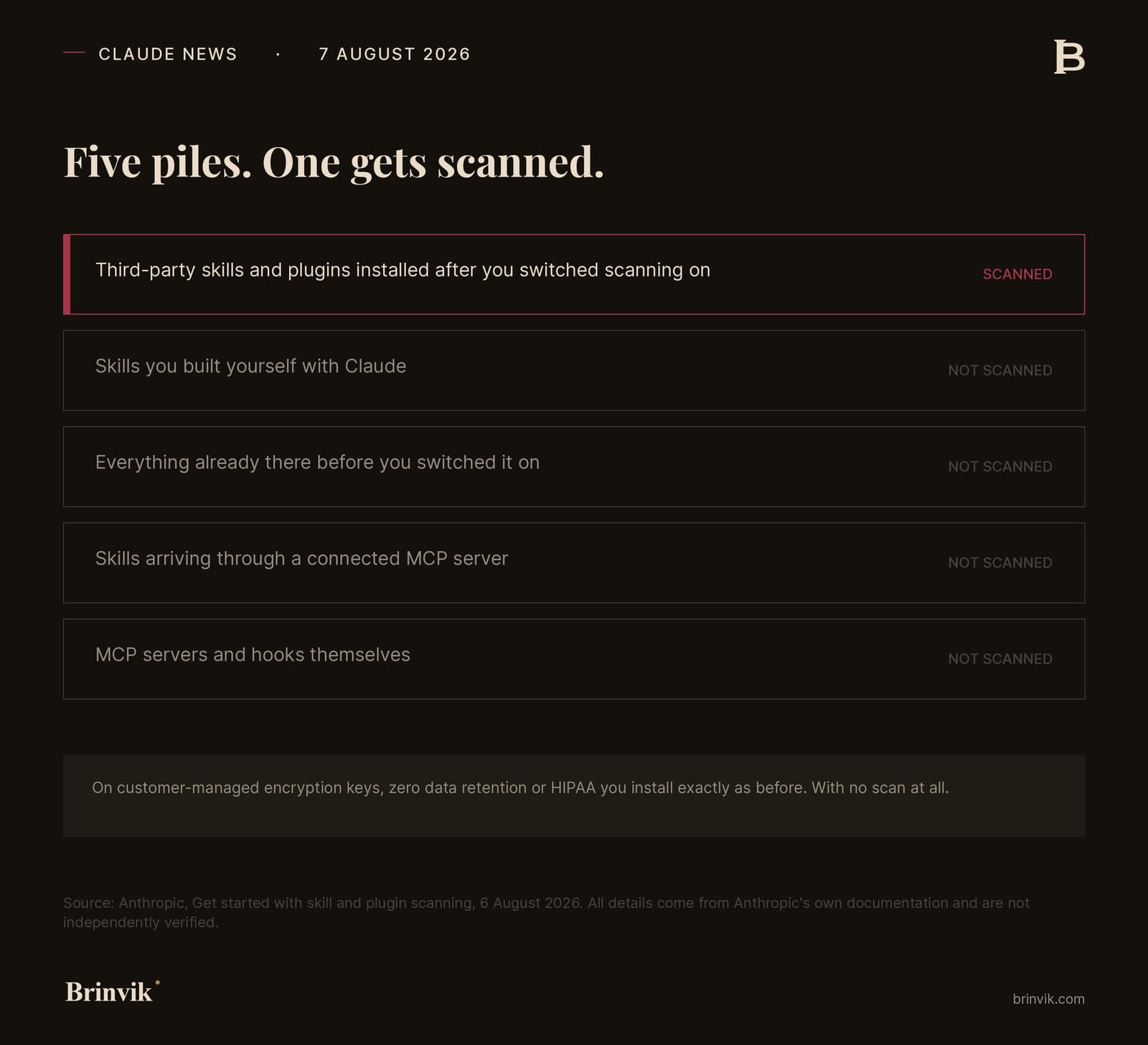
Pile 1. Third-party skills and plugins installed after you switched scanning on. These get scanned. It is the only one of the five piles that does.
Pile 2. Skills you built yourself with Claude. Not scanned. Anthropic relies on its own built-in safeguards here, which is reasonable enough, but it means that pile never gets a stamp.
Pile 3. Everything that was already there before you switched scanning on. Not scanned. Not retroactively, not on next use, never. Anthropic says it plainly: existing skills and plugins keep working, so nothing you already use stops the day you flip the switch.
Pile 4. Skills arriving through a connected MCP server. Not scanned. They follow the same trust model as other MCP tools.
Pile 5. MCP servers and hooks themselves. Not scanned. Not at all, this time around.
And on top of the five piles sits a sixth limitation, which is not about the skill but about your configuration. Organisations using customer-managed encryption keys, zero data retention or HIPAA configurations install exactly as before, with no scan at all.
The only combination that gets checked
Put the two axes together and the picture gets clearer. One axis is when the skill arrived, relative to the day you switched scanning on. The other is which configuration you run.
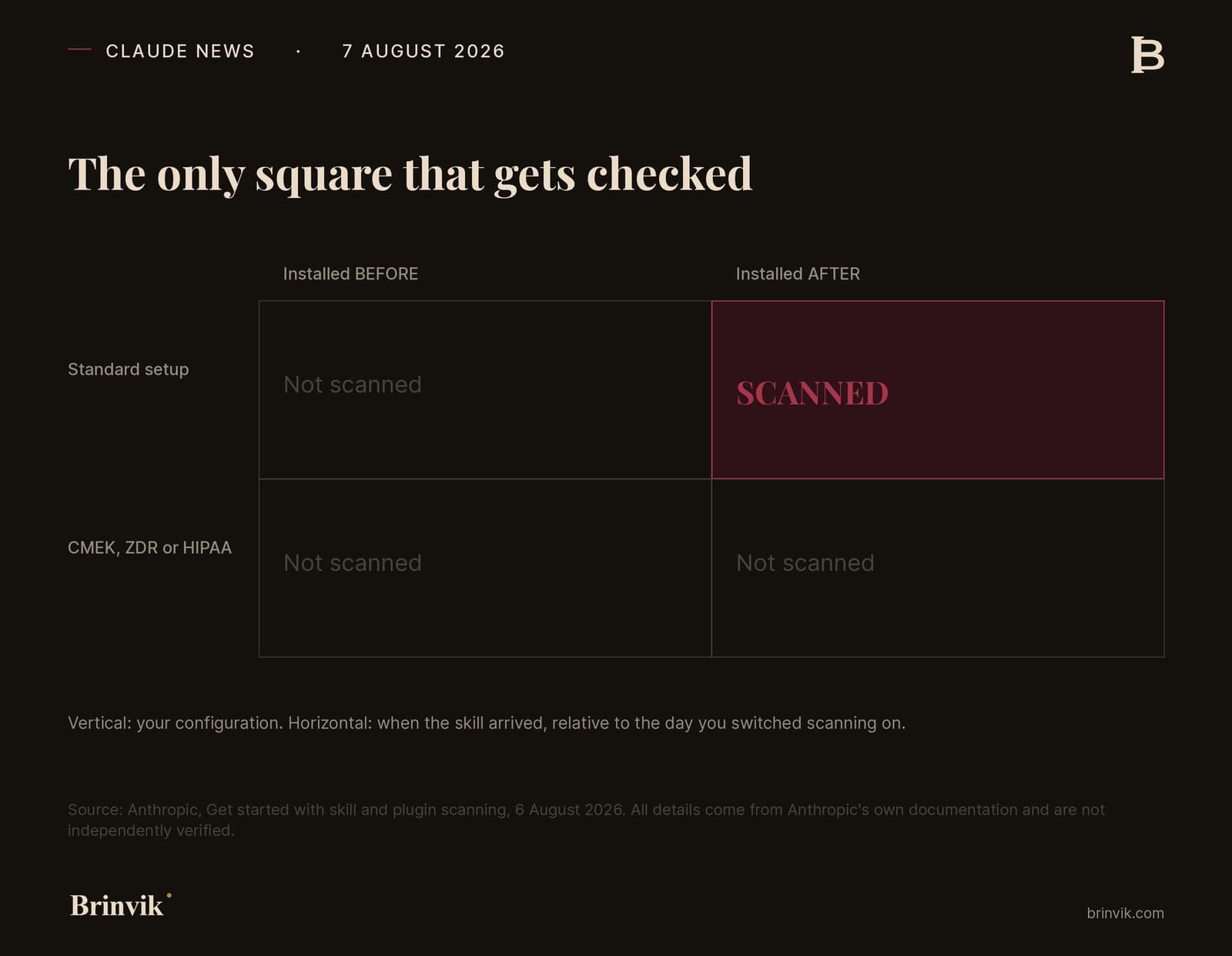
Notice what the bottom row means. The configurations chosen by the most security-conscious customers are exactly the ones that do not get the new check.
That is not a bug, and I do not think it should be read as one. It follows from the fact that scanning requires the content to be processed somewhere, and those configurations exist precisely to limit where data may be processed. You cannot have both at once. But it is worth knowing if someone in the building assumes the tightest configuration automatically gives the best coverage across everything.
What does not happen when you switch it on
In my judgement this is one of the most important points in the whole announcement, and it is also the easiest to read past: switching scanning on does nothing to what you already have.
Pile 3 does not go away. If your company has run Claude for six months with skills employees found themselves, that entire history is untouched the day after you flip the switch. You have gained a control on new things. You have not gained an overview of the old ones.
It is an important distinction, because the two feel identical from the inside. A green setting appears in administration, and with it a sense that this is handled now. But the only way to get existing skills covered is to reinstall them, and that is a decision someone has to make deliberately.
So the first real task is not a setting. It is a list. What is already there, who put it there, and where it came from.
Commercial interest, said out loud: I build and sell skills, and I run exactly this kind of review as part of my work. So I have an interest in you finding it important. Judge the argument, not the messenger. I run the same review on my own setup whether or not anyone is paying me for it.
Here is my view
On balance this is a good thing. Fewer malicious skills get through, less prompt injection reaches people who had no chance of spotting it themselves, and the threshold for doing harm with a shared file goes up. I am glad Anthropic is building it, and I think it is the right direction.
And that is exactly why it is worth watching what it does to your own attention.
When a machine puts a tick in a box, people stop looking. That is true of antivirus, it is true of cookie banners, it is true of every automated check anyone has ever rolled out. A skill that has passed feels approved. It is not approved.
What is notable is that Anthropic says so more clearly than most vendors would.
A pass result means the scan didn't find that kind of threat. It isn't a guarantee that a skill is safe in every respect, and it won't catch a skill that behaves in ways you didn't intend without being malicious.
The kind of threat the scan looks for is third-party skills built to misuse the access they are given. For example, quietly moving your data somewhere it should not go. That is one thing. It is an important thing. It is not everything.
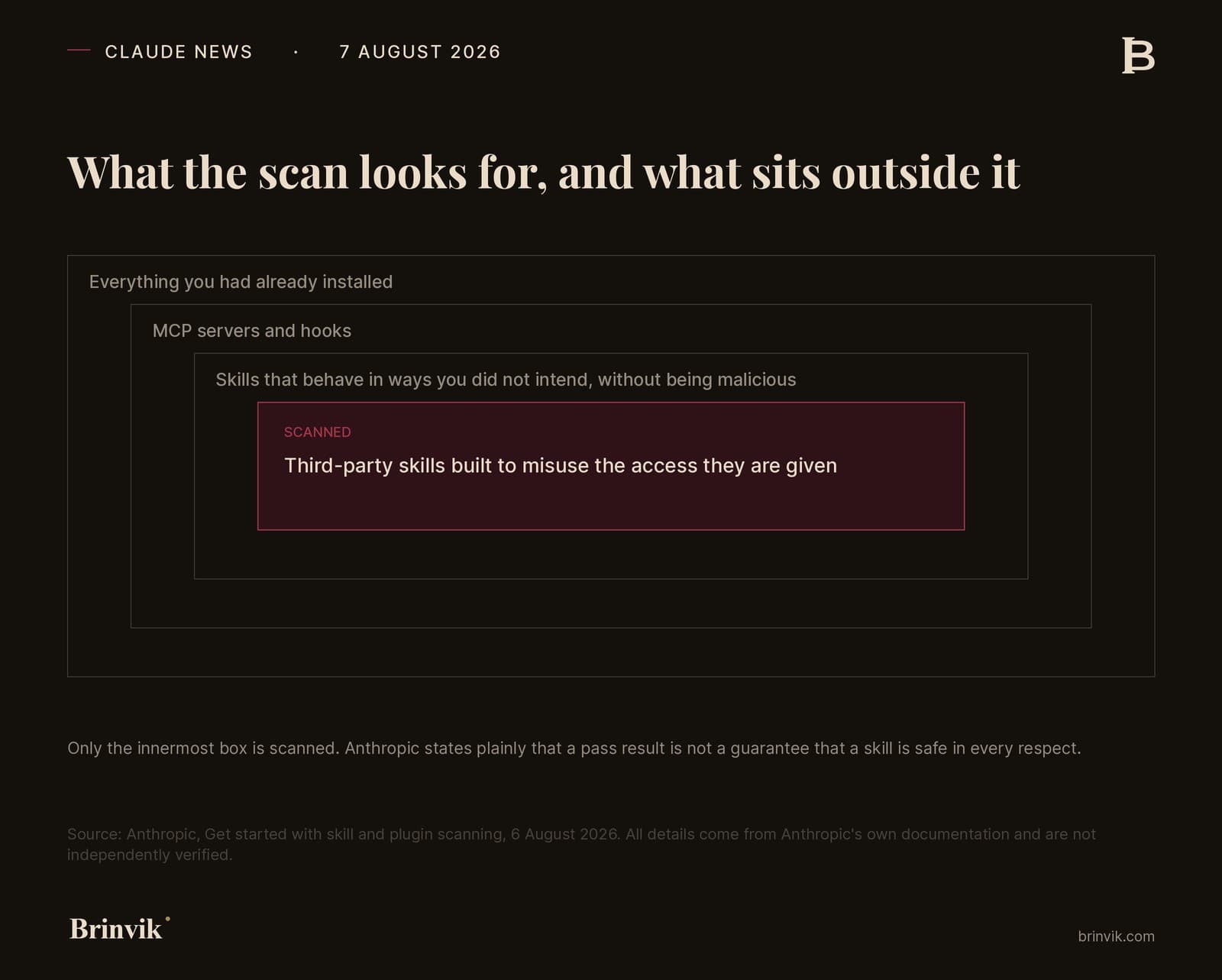
So take the tick. It is better to have it than not. Just do not let it replace the question of why this skill needs installing at all, and what it can reach once it is in.
It is coming to Team. I will say that out loud
If you sit in a 30-person company on a Team plan, you cannot switch anything on today. That does not make the story irrelevant, because Enterprise is not the end of the line.
Anthropic's own release notes show the pattern clearly enough to plan around.
Claude in Chrome. Experimental extension in August 2025. Expanded to 10,000 Max users in September. Beta to all Max subscribers in November. Beta to all paid plans, including Pro, Team and Enterprise, in December. Four months from experiment to everyone who pays.
Cowork. Research preview on Max, macOS only, on 12 January 2026. Extended to Pro four days later. Generally available on macOS and Windows on 9 April. On web and mobile on 7 July, again starting with Max and more plans to follow.
Memory. Team in September 2025, Enterprise a week later, Max and then Pro in October, and all users including the free plan on 2 March 2026. Here it did not go top down, but it went the same way: from few to all.
The Enterprise plan itself. Could only be bought through a conversation with sales. Became self-serve on 12 February 2026.
So the pattern is not that Anthropic always starts at the top. The pattern is that they start somewhere narrow and widen, and that they never go the other way.
There is also a practical reason to believe it here specifically. Team plans got a plugin marketplace and admin controls back on 24 February 2026. The surface this would sit on already exists on Team.
What does not arrive on its own is the decision about who may install what. Someone has to make that, and it can be made today.
What this means for you
Owners and leaders of small and mid-sized companies
You probably do not have Enterprise, so you cannot use the feature today. That does not change the fact that the question is yours.
Your organisation already runs AI tools with access to mail, files and customers. Skills are instructions those tools follow. Nobody asked your permission, because it does not look like installing software. It looks like someone switching something on in an app you already approved.
What you need to decide is not technical. It is whether anyone owns the decision about what may be installed. There are two possible answers in your company right now: either a specific person or role decides, or anyone may install what they like. If you have never discussed it, the answer at your company is that anyone may. Not because someone chose it, but because nobody chose anything else.
The yardstick is simple: can you find out in ten minutes which AI tools have access to your customer data, and who gave them that access? If you cannot, that is the job, not a new feature.
Operations and transformation leads
You are the one who will build the list, and it is cheaper than it sounds. Customize and then Skills gives you the starting point in under two minutes.
Three questions are enough to get moving: which skills and plugins are in use here, who installed them, and which of them can reach something it would hurt to lose. The third question is the important one. A skill that formats a document is not the same as a skill that reads your inbox.
The operational consequence to plan around is the lack of retroactive coverage. When scanning eventually lands on your plan, it will not cover what is already there. If you want the history covered, it has to be reinstalled. That is a cleanup task you can put in the calendar now, while things are quiet, rather than discovering it the day the feature becomes available.
Sales and RevOps leads
Your tools typically have the broadest access to customer data. CRM, mail sequences, meeting booking, lead enrichment. A skill or plugin working on top of those sits closest to the most sensitive thing the company holds, and that is also where personal data actually lives.
It is also where the pace is highest. Someone finds a tool that saves two hours a week, and it is installed before lunch. That is not irresponsible, it is how good salespeople work, and a process that slows it down will be routed around within a month.
So do not ask for it to stop. Ask that there is one place where someone says it out loud when something new gets access to the CRM. One line in a channel is enough. That is the difference between an overview and a guess, and if you ever have to document who has processed customer data, that line is all there is.
Product and engineering leads
Two things hit you directly, and they point in opposite directions.
First: if you build skills for yourselves and your colleagues, expect to be scanned one day. A block cannot be appealed, not by the person uploading and not by your own admin. That means you need to be able to fix and republish quickly, and you cannot build a workflow where a human approves their way around a block. If you are building something for broad internal use, it is worth running it through the scan early, while changes are still cheap.
Second: skills you build with Claude are not scanned. That sounds like an advantage, and in the short term it is one. But it is also a blind spot, because that is precisely the pile that grows fastest once people are properly up and running. The better you get at building your own, the larger the share of your setup that no automated check ever looks at.
If you are in Claude Code, /doctor exists. Be clear about what it is: a diagnostic check of the setup itself, covering installation, settings files, MCP connections and unused extensions. It is useful, but it does not tell you where a skill came from or what it can reach. That question still has to be answered by a person.
Five things you can do this week
None of them require Enterprise, and none of them require anyone to switch anything on.
- Open Customize and then Skills, and look at what is there. On Team and Enterprise, check the "Your organization" tab too. It takes two minutes, and it is where the list starts.
- Mark the ones with access to customer data, mail or files. That is the short list that actually matters, and it is usually much shorter than the long one.
- Write down who may install. One name or one role. Not a four-page policy nobody reads.
- Decide what happens with MCP servers. They have the most reach, and they are not scanned, not even on Enterprise.
- Put a date on a review. Once a quarter, in the calendar, with a name against it. Otherwise it will not happen.
And one more thing, which is not a security task but solves part of the problem from the other side: build the skills you use most yourselves. A skill you wrote, you know exactly what it does, and you avoid having to assess a stranger's instructions. That is a bigger conversation, and I will take it separately.
Data handling and GDPR, briefly
There is one technical detail worth knowing if someone in your organisation has to approve switching scanning on.
When a skill or plugin is scanned, the contents are processed in an isolated environment kept separate from your normal Claude sessions. The copy is deleted once the scan finishes, and only the result and some basic metadata are kept. Anthropic notes that scanning runs outside your normal session, so it does not change how Claude responds to you.
What gets processed is the skill file itself, not your data. That is a relevant distinction if someone asks what is actually being sent where. And as noted: if you already run customer-managed keys, zero data retention or HIPAA, you do not get the scan at all, precisely because those configurations limit where processing may happen.
If your company has lost track of what got installed along the way, that cleanup is exactly the kind of work I do, together with a setup that stays manageable afterwards. Read more about internal AI tools, or write to me and tell me how many skills you think you have.
My prediction
I think this lands on Team within the next couple of months, and on Pro after that. Anthropic has said nothing about it, so this is my judgement and not news. It rests on two things: their own release notes show the same pattern again and again, and Team has had a plugin marketplace and admin controls since February, so the surface exists.
I also think the next real discussion will not be about skills. It will be about MCP servers, which have far more reach than a text file of instructions, and which today are not scanned at all.
That is a prediction. Write it down and hold me to it.
Sources
Primary sources, Anthropic
- Claude release notes, 6 August 2026
- Get started with skill and plugin scanning
- Browse skills, connectors, and plugins in one directory
- Provision and manage skills for your organization
- Manage custom roles on Enterprise plans
- Commands, Claude Code docs
The rollout history for Claude in Chrome, Cowork, Memory, the Enterprise plan and the Team plan's plugin marketplace is taken from the release notes page above.
All factual detail about the scanning comes from Anthropic's own documentation and is not independently verified by a third party. The numbers for my own setup were counted in the session where this article was written.
Division of the work
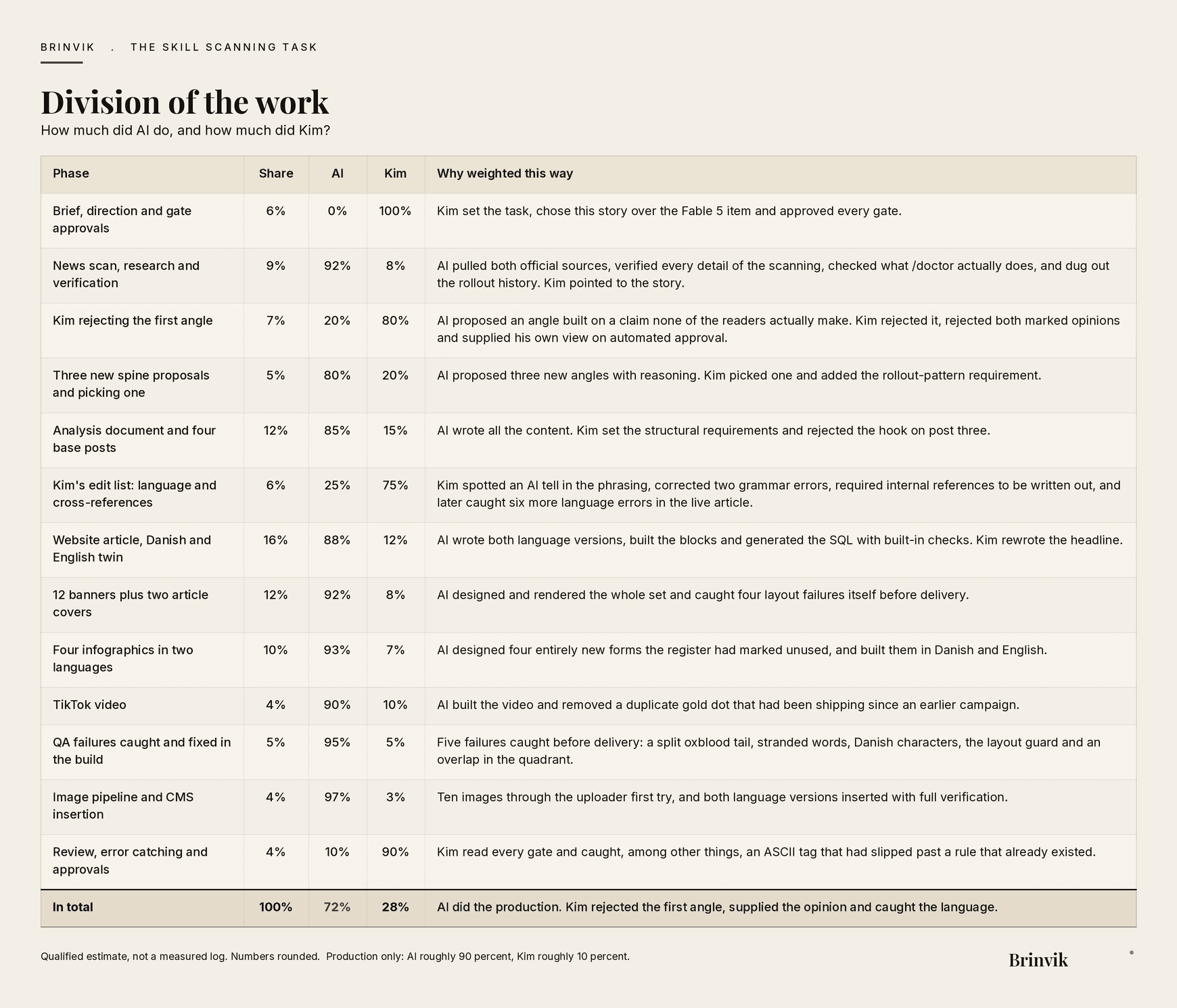
This work was produced in collaboration with AI. Overall: AI roughly 72 percent, Kim roughly 28 percent. Looking only at production, meaning the finished output, the figure is roughly AI 90 percent and Kim 10 percent.
The numbers are a qualified estimate, not a measured log. The AI share sits mid-range this time, even though AI caught five layout failures in its own work along the way. The reason is that I rejected the first angle outright, rejected both proposed opinions and supplied my own, and afterwards found six language errors in the finished article. That kind of thing pulls the other way, and it should.
FAQ
Frequently asked questions
A skill is a file of instructions that Claude reads and follows when the task fits. It is not a program running in the background, and it does not ask for access as it goes. That is why skills typically enter a company without the decision you would make about ordinary software.
It is in beta and exists only on Enterprise plans, in Claude, Claude Cowork and Enterprise plugin marketplaces. It is off by default and has to be enabled by an Owner or Primary Owner. Team, Pro and free users do not have it today.
No. Scanning applies only to what is uploaded or edited after you switch it on. Everything already there keeps working and is never scanned retroactively. If you want it covered, it has to be reinstalled.
It cannot be used, and the banner explains the specific reason. Neither the person who uploaded it nor the organisation's admin can approve it anyway. The only way forward is to fix the content and upload again, because the same file unchanged returns the same answer.
No. MCP servers and hooks are not scanned, and neither are skills that arrive through a connected MCP server. That is worth noting, because an MCP server typically has broader access than a single skill file.
No, and Anthropic says so itself. A pass means the scan did not find the one kind of threat it looks for, namely third-party skills built to misuse their access. It will not catch a skill that behaves in ways you did not intend without being malicious.
Open Customize and then Skills in the left sidebar of Claude, on the web or in Claude Desktop. On Team and Enterprise, the Your organization tab also shows skills colleagues have shared across the organisation. That is the fastest starting point for a list.
Nothing beyond the Enterprise plan itself. Anthropic states that scanning runs automatically at no extra cost once it is enabled for the organisation.