TL;DR: Claude Cowork is now on web and mobile, not just desktop. The important part sits under the surface. Sessions now run remotely on Anthropic's servers, so scheduled tasks run even when your computer is off. Four things that many users have been frustrated by disappear at once: the missing shared memory between Chat and Cowork, tasks that would not run without a computer on, work locked to a single device, and the hassle of copying summaries and prompts back and forth.
The update just landed, and for most companies it matters more than a headline about a mobile app suggests. In short, it is about AI workflow automation that can finally run by itself. Here is what is new, what still needs desktop, and what it means for your business.
Anthropic's official overview: Cowork on web, desktop, and mobile →
Cowork runs your sessions remotely (in beta), so your sessions and files live with your Claude account and go where you go, on any device.
What is new in Claude Cowork
Until now, Cowork lived only in the Claude Desktop app on your own machine. All the work ran locally, and if the computer was off, nothing happened. A scheduled task needed the machine awake at the right moment.
That has changed in three ways. First, you can use Cowork on the web via claude.ai and on mobile in the Claude app for iOS and Android, not just on desktop. Second, a session now runs remotely, meaning on Anthropic's servers instead of on your computer, and your sessions and files are saved to your Claude account. Third, Chat and Cowork now share one entry point, so you start both from the same message box and can draw on the same project knowledge.
It is all in beta on web and mobile, and rolling out over the coming weeks starting with the Max plan, then more plans.
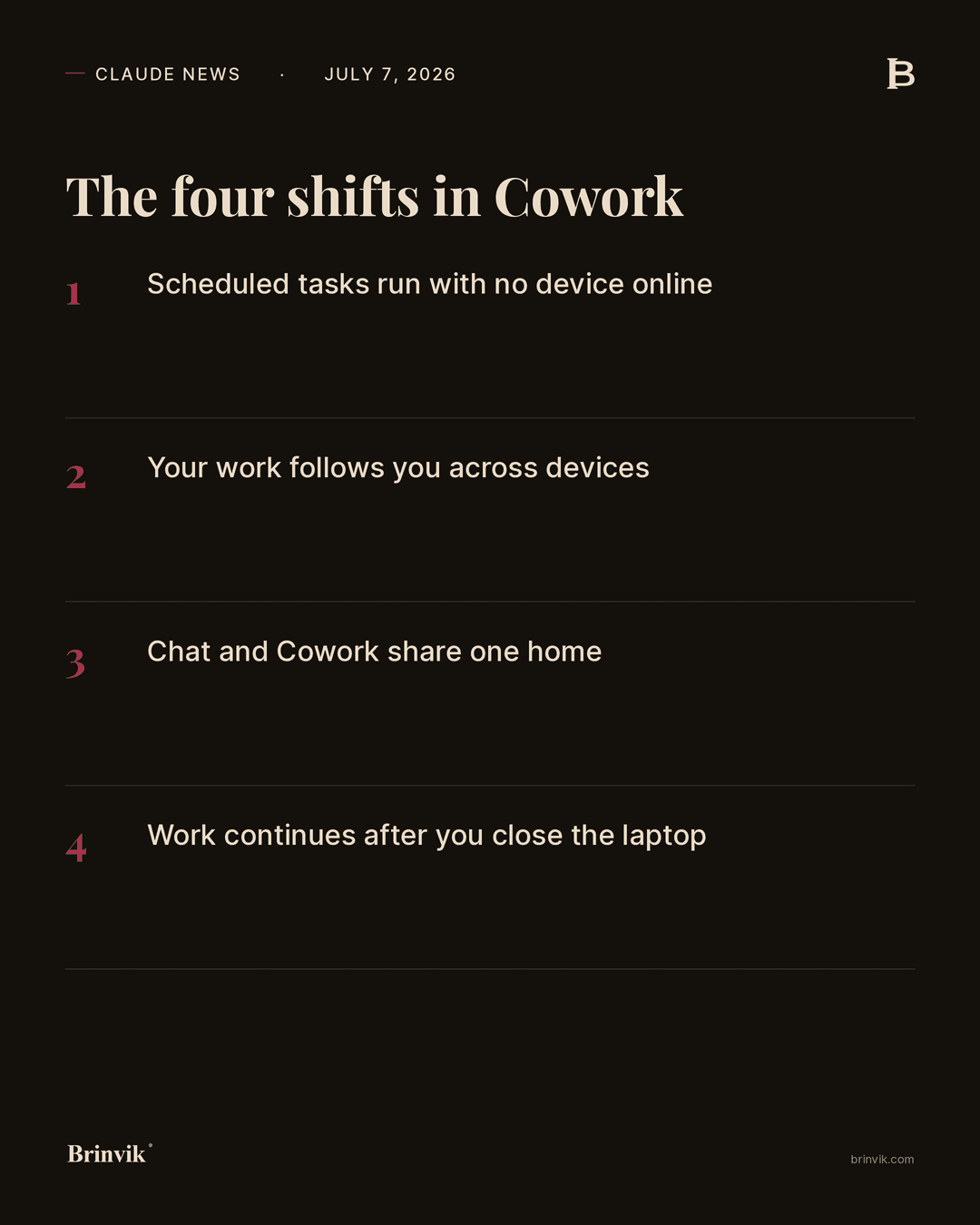
The four shifts, one at a time
1. Scheduled tasks run with no device online. The biggest shift. A scheduled task now runs remotely, so it no longer needs a computer that is on and awake. A nightly scan, a weekly report, or a standing follow-up happens whether or not anyone is logged in.
2. Your work follows you across devices. Sessions and files live on your Claude account, and the same sessions are available on desktop, web, and mobile. You can start a task on the computer, follow it on your phone, answer a question along the way, and pick up the result wherever you are. When Claude finishes or needs input, you get a notification on your phone.
3. Chat and Cowork share one home. You start both from the same place, and projects exist on every device. When you work from a project, Claude uses the project's knowledge as context, whether you are in chat or in Cowork.
4. Work continues after you close the laptop. Because the work runs remotely, you can close the laptop while a longer task finishes in the background.
What still needs desktop
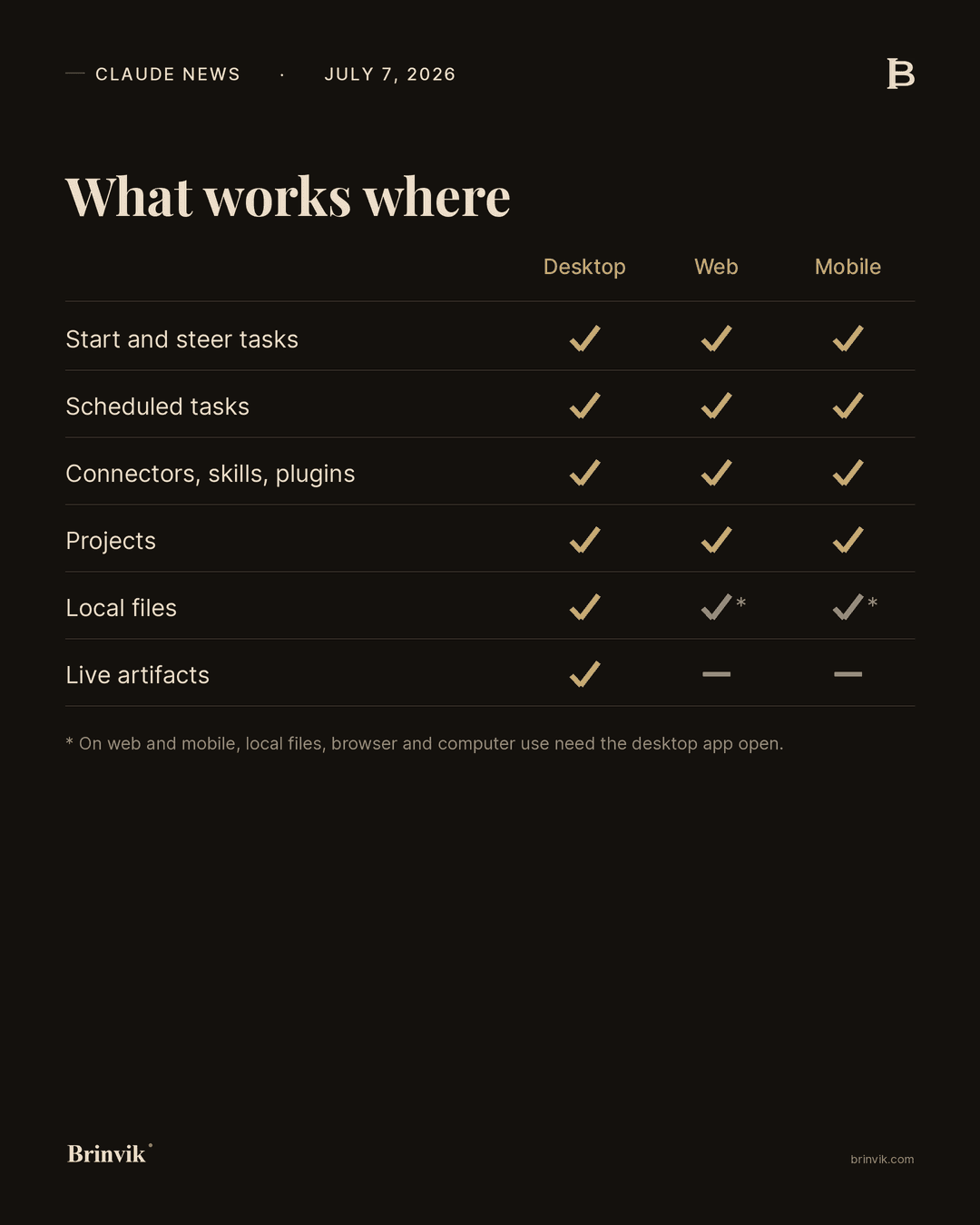
It is important not to promise too much here. The full Cowork experience is still on desktop, because some features reach out to your own computer. They need the Claude Desktop app open on the machine, even when the session itself runs remotely.
That covers local file access, where a remote session can only read and write in your connected folders while the desktop app is open. It covers browser use through Claude in Chrome. It covers computer use, where Claude clicks and navigates on your screen, and which is still a research preview on Pro and Max. And it covers live artifacts, the live, updating views that exist only on desktop.
Web and mobile, on the other hand, can start, steer, and follow tasks, use connectors, skills, and plugins, preview files Claude creates, and run scheduled tasks. The line is drawn when the work needs to touch something on your own machine.
My take: the mobile app is not the important part
Here is my take, and it is a judgement, not a fact. The most important change is not that Cowork now exists on more screens. It is that scheduled tasks can run with no device online. That moves Cowork from an assistant you start and sit next to, to something that can run as part of operations.
That has a consequence most people will underestimate at first. When a task can start and run all the way without you, your approval points, the places where a human signs off before the agent moves on, need to be rethought now. Set them wrong, and the work either stalls waiting for you, or it runs past a point where you actually wanted to look. My recommendation is to review your scheduled tasks with fresh eyes before you turn them up, not after.
What it means for Nordic B2B SaaS companies
For a Nordic B2B SaaS company, the immediate gain is that fixed, knowledge-heavy tasks can be put on a schedule and run by themselves. Think a nightly pull on new signups, a weekly summary of support tickets, a standing draft of release notes. That is work which previously required someone to remember to start it on a machine that was on.
Because sessions and projects are now the same across devices, it also becomes easier to let a team share the same context instead of each person keeping a loose chat. Put the shared knowledge in a project, and both chat and Cowork draw on it. That cuts the kind of double work where two people explain the same thing to Claude from scratch.
What it means for telemarketing and sales teams
For a telemarketing or sales team, the value is follow-up and research that runs without anyone minding it. A nightly pull on the day's meetings, a standing cleanup of the pipeline, a draft of follow-up emails ready in the morning. It runs now, whether or not the rep's computer is closed.
The same mechanic that drives the internal tasks is also what can, over time, drive an agent on the website that qualifies leads and books the right meetings. For a sales team, this is less about the technology and more about the boring, important part of the work finally happening by itself, so reps spend their time on the conversations.
What it means for professional services firms
For a law firm, an accounting practice, or an advisory firm, the big question is always where data sits and who has looked at it. The ability to run tasks remotely makes automation easier, but it also moves data to the cloud, and that calls for a deliberate stance.
The practical path is to separate the work. The sensitive, client-facing work can stay in local desktop sessions, where files stay on your own machine, while the general, heavy routine work goes on a schedule. That way a services firm gets the gain without giving up the confidentiality clients are paying for.
What it means for founders and scale-ups
For a founder or a scale-up team, this is close to the ideal of the agent working while you sleep. Start a longer piece of work, close the computer, and pick it up on your phone. For a small organisation where the same few people have to do everything, that is real extra capacity.
But keep in mind that it is beta and rolling out gradually with the Max plan first. Do not build a critical workflow on top of access that is still changing. Use it to get more done now, and make it standing operations once the rollout has reached your plan.
Security, GDPR, and where your data lives
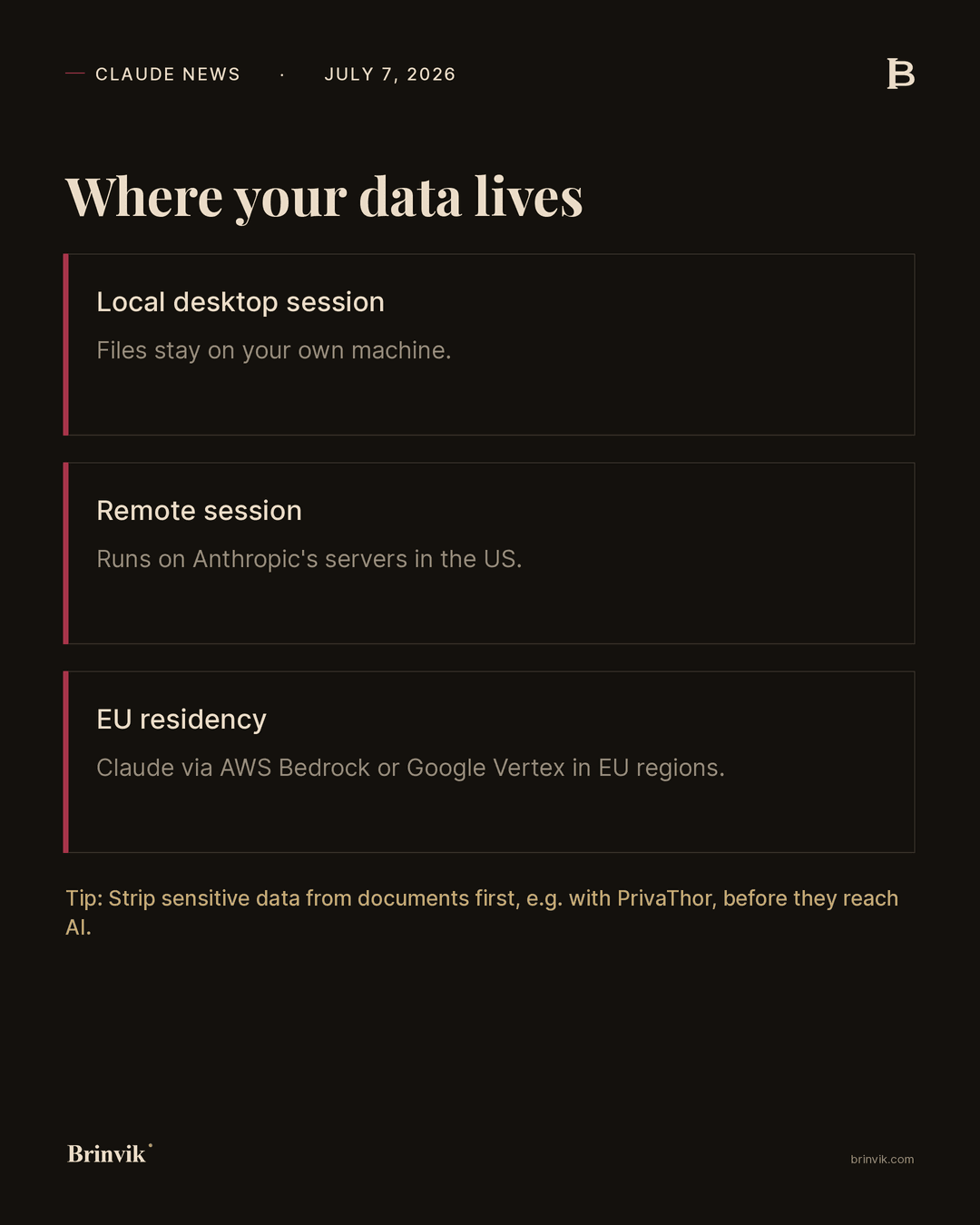
A remote session runs on Anthropic's servers, and your sessions and files are saved to your Claude account. That is exactly what makes the four shifts possible, and it is also a change in where your data sits.
Native Claude is hosted in the US and does not offer EU residency by default. If you move personal data into a remote session, you are effectively moving that data to a US cloud. For many tasks that is fine. For a company handling personal data, it is a decision to take deliberately.
There are three practical paths. Keep the sensitive work in local desktop sessions, where files stay on your machine. Run Claude through AWS Bedrock or Google Vertex AI in their EU regions when EU residency is a requirement. Or clean the documents before they reach the AI, for example with a tool like PrivaThor that strips sensitive data from a document up front. That is the kind of scoping that lets you take the gain and still hold up in an audit against SOC 2, ISO 27001, or GDPR.
Three things to do this week
If you already use Cowork, there are three concrete things worth taking on now.
First, review your scheduled tasks. Now that they can run without a computer on, check that each one still does the right kind of work, and that a human approves the places where it matters.
Second, gather the shared knowledge in a project instead of in loose chats. Then both chat and Cowork draw on the same thing, and you stop explaining the same context from scratch each time.
Third, decide per task what may run remotely and what should stay in a local desktop session. That decision is what keeps you on the right side of GDPR as you turn up AI workflow automation.
The hard part is rarely understanding what an update can do. The hard part is putting it safely into operation in your specific business, with the right boundaries and without failing an audit. That is exactly what Brinvik helps with: getting Claude into your own workflows, under your own data and security rules, so your team can keep building after I leave. If you want to see where your heavy routine work can run by itself, take a look at internal AI tools.
Sources
Primary sources:
- Anthropic, Claude release notes, July 7, 2026
- Anthropic, Use Claude Cowork on web, desktop, and mobile
All product details come from Anthropic's own pages. There are no vendor or customer claims requiring independent verification in this release.
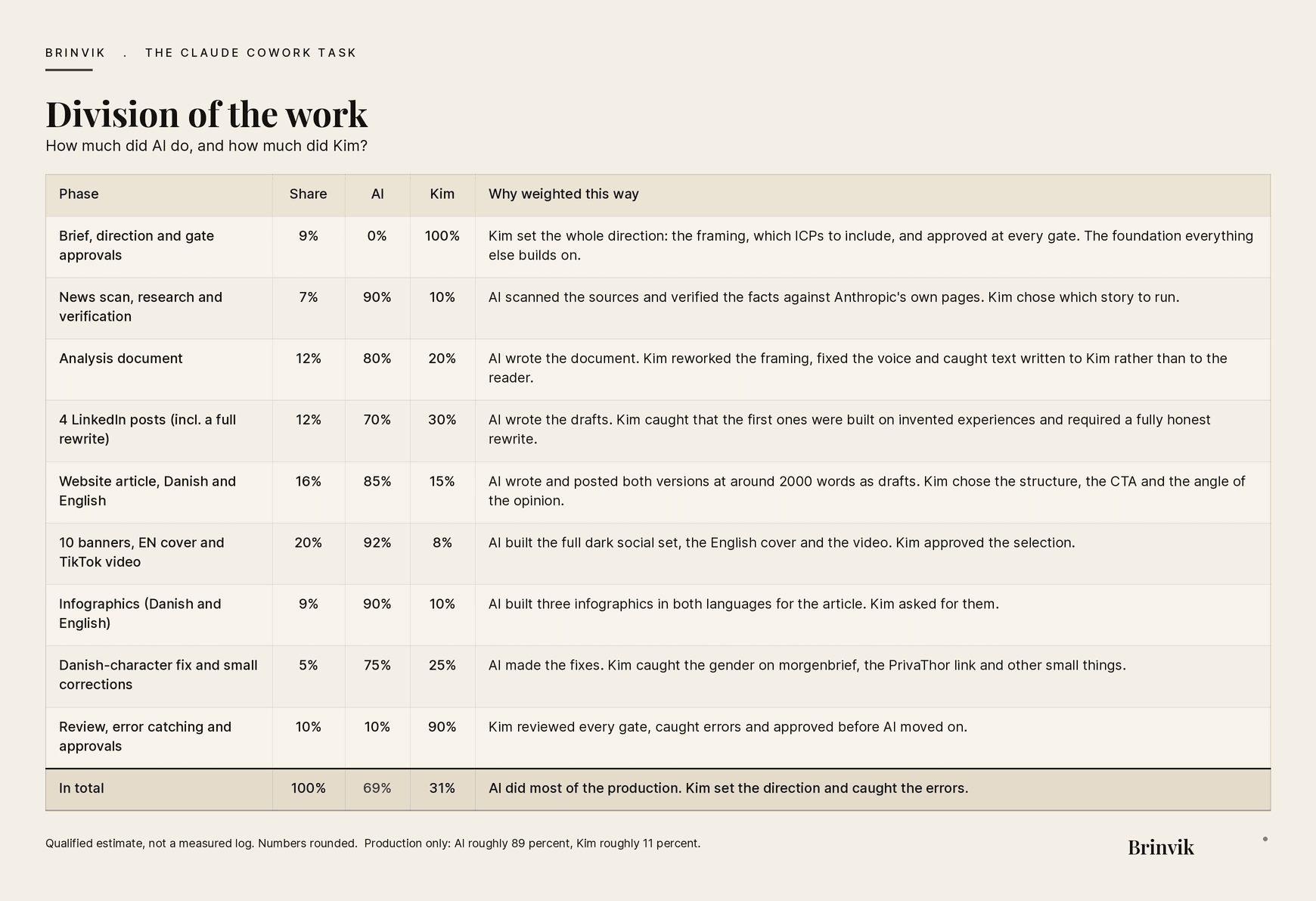
This work was produced in collaboration with AI. Overall: AI roughly 69 percent, Kim roughly 31 percent. The numbers are a qualified estimate, not a measured log.
FAQ
Frequently asked questions
Yes. With the new remote sessions, scheduled tasks run on Anthropic's servers, so they no longer need your computer to be on. The exception is tasks that need local files, the browser, or computer use, which still require the Claude Desktop app to be open.
It depends on how you use it. Remote sessions run on Anthropic's servers in the US, so sensitive data should either stay in local desktop sessions, run via AWS Bedrock or Google Vertex in EU regions, or be cleaned before it reaches the AI. With deliberate scoping, you can take the gain and still comply with GDPR.
You start both from the same message box. Chat is for conversation, while Cowork is for tasks the agent carries out itself over several steps. They now share projects, so you can put shared knowledge in a project and both draw on it.